Add-in 2 System Error. Code 33

User has also report Code 33 error.

When running Test application there appeared to be no issue.

Compiled 32 & 64bit EXE files are created separately, not as a combined EXE.

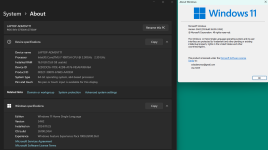
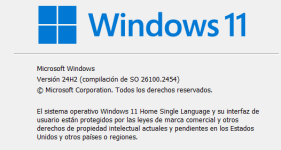
Below is users Window System information.
Win11UserSystem
 
These 2 updates only. after that I asked my client to temporarily turn off the windows update until we fixed the problem
(attachments)
Screenshot 2024-11-29 170335.jpg
 
Last edited:
Same here. What should the outcome of running that file be? I was hoping for a beta version of XMLPadlock to test on 24H2…
 
We are working on this issue. It is due to a Preview update Microsoft released some days ago for Windows 11 24H2 users: KB5046740.
If you uninstall that preview update, it works again.
Our third-party provider of the faulty component we are using in XLS Padlock has been advised too and they are working on the issue too.
Hopefully, we’ll get a fix soon.
 
I’ve also encountered the same issue and cannot uninstall the KB5046740 update. Have others experienced problems uninstalling it as well?
I thank you in advance; please keep us updated.
 
Update: the problem has been identified.
Caused by the Microsoft KB5046740 update.
Uninstalling this KB (remind that this is a Preview and not the final release by Microsoft) fixes the issue; but this is not a valid fix.
Note: it does not occur on all computers with KB5046740 installed. Some customers with that update do not get the error code 33.

👉 A fix is in preparation and will be made available as soon as the tests are successful. The fix will be integrated into XLS Padlock 2024.3.

Thank you for your patience.
 
Hope this helps:

An affected client says he is using TotalAV for his AntiVirus progam.
  • Are there any other affected users using the same AntiVirus program?
Another client Fixed it by doing this:

Uninstalled three recent updates, put updates on pause and disabled auto-install, waited ½ hour (for good measure), resumed downloads (with auto install still disabled), after all downloaded he selected the “install all” option, then Restarted after all installed, problem went away.

Hope this helps the GDG Team
 
Last edited:
Just want to add client had to restart system after removing update:

“Caused by the Microsoft KB5046740 update.”

Thanks for the quick id and solution
 
gdgsupport said:
XLS Padlock 2024.3.
Great any idea when XLS Padlock 2024.3 will be ready?
  • have a few clients driving me nuts
  • by the way they’re all using Surface Pro 7 (Error 59 even with the 2024.2 update)!
 
Last edited:
I tested the 64 bit version. It works properly. No code 33 error and the workbook opens correctly.
Please notify us when the new build is avaialble 🙂
 
Last edited:
Thank you. Yes, we’ll keep you informed.
A random unexpected crash has made us postpone the initial release of today. But it should be OK for Monday or Tuesday.
 
Back
Top