WooCommerce Integration Kit not working

KMTob

New member
Nor the activation kit. Well i checked the server and followed the guide but unfortunately i got a huge error message trying to activate the compiled exe file. Did anyone have the same problem and solved it?

It shows: page not found?

the base url is: mywebsite.com/wordpress? or just mywebsite.com?

I don’t know what to do right now
 
Last edited:
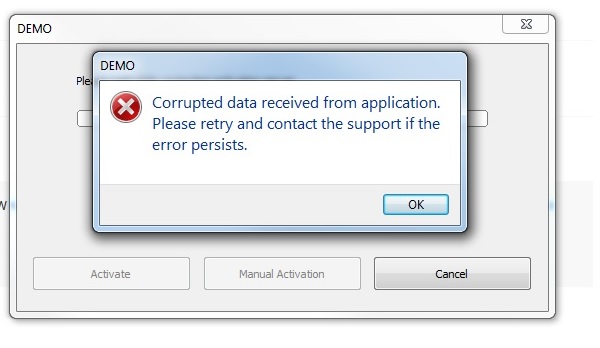
what does that mean? trying to activate the application failed.
screenshot-problem
 
Last edited:
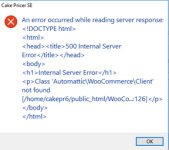
It’s possible that your WordPress website has a plug-in that interferes with the integration kit or maybe your host doesn’t support .htaccess in subfolders. In fact, the long message shown on the screenshot below indicates that WordPress is still processing the query sent from your EXE. That’s the problem: it’s the WooCommerce Kit that should be processing it.
What host company do you use?
Do they provide .htaccess support in subfolders?

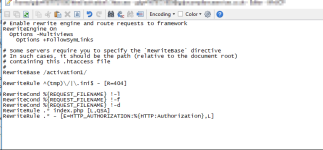
Finally, some hosting companies such as godaddy have specific .htaccess rules that can interfere. For instance, for a customer, we had to modify the .htaccess file so that the .htaccess config file in the “activation” subfolder could be recognized by godaddy’s server.
Here is an extract:

image
 
Last edited:
KMTob said:
what does that mean? trying to activate the application failed.
It’s because your server does not return the expected activation data, but other HTML content. It’s related to the other error you mentioned.
 
Sure. The WooCommerce Integration Kit works for a majority of customers. But on some hosts, some minor restrictions can cause problems. Have you checked the .htaccess problem above? It’s certainly the error you are getting too on your server.
 
Can you or anyone who made the woocommerce kit run, have a look at this. Thank you!
 
Last edited:
It’s not the .htaccess in your web root that should be modified. But the one in the “activation” folder where you unpacked the WooCommerce Integration Kit.
What is the name you have for the “activation” folder?
 
Last edited:
Its name is “activation”.

And for the other prdouctvarations its simply activation2, activation3 and so on.

thx
 
Then, use your FTP server and locate the “.htaccess” file in the “activation” folder.
It should begin with:
Code:
# Enable rewrite engine and route requests to framework
RewriteEngine On

# Some servers require you to specify the `RewriteBase` directive
# In such cases, it should be the path (relative to the document root)
# containing this .htaccess file
#
# RewriteBase /
Change
# RewriteBase /
to
RewriteBase /activation/

(and without the # at the beginning)

Save changes.
 
Last edited:
Wow, seems it is working now. I am testing it now, but i am very very happy. May you please add this change to your documentation? This migh be important for somebody. Thank you gdgsupport
 
Last edited:
KMTob said:
Wow, seems it is working now. I am testing it now, but i am very very happy. May you please add this change to your documentation? This migh be important for somebody. Thank you gdgsupport
Great that this fixed your problem. Sure, we’ll add this to the documentation in the next update.
 
That’s not the same problem. Seems that the structure with files and folders isn’t correct (did you correctly upload the files?).
 
Back
Top