Way to lock external exe files? - SOLVED

oldteacher

Active member
Is there a way to prevent external exe files from being opened directly? In other words to only be opened by EXEOut link?

Figure not but certainly worth asking:)

Thanks.

PS: any news on V2 coming out of beta?
 
Last edited by a moderator:
Hello,

This is something you can evently only do on your own computer by changing the default program that open exe file. But it is not something i will adwice you to do.
Now, if you want to use Exoutput to open an exe file you can create and use the follwing procedure in UserMain HEscript:

First, `put the exe file you want to open in Data Folder of the Exoutput software your create, you can for example create a folder named “addon”;

Then create the following procedure:
procedure RunProgram(Filepath: String);
var
ProgramPath, MyProgram: String;
begin
ProgramPath := GetGlobalVar(“HEPHPDataPath”, “”);
MyProgram := ProgramPath + Filepath;
MyProgram := ReplaceString(MyProgram, “&”, “/”);
RunAProgram(MyProgram, “”, ProgramPath, false, SW_SHOWNORMAL);
end;
Then you must create the link in a page to automatly open your exe, for exemple in php.
We suppose that your exe file is in addon folder you created:
$storage = exo_getglobalvariable(‘HEPHPDataPath’, ‘’);
if(file_exists($storage.‘addon/exe-path/exe-name.exe’)){
exo_runhescriptcom(“UserMain.RunProgram|addon&exe-path&exe-name.exe”, “Error”);
}
In exo_runhescriptcom, you must replace / with &.in your exe-path.

Hope this help.
Gilbert
 
Last edited:
It can’t be done by your ExeOutput application directly. The sole way is to modify the external EXE files so that they can run only if some command-line parameter is given by the ExeOutput application.
For instance something like:
if you run EXTERNAL.EXE it will throw an error
if you run EXTERNAL.EXE mysecretcommand it will be OK.

ExeOutput is able to run EXE files and pass command-line parameters.
 
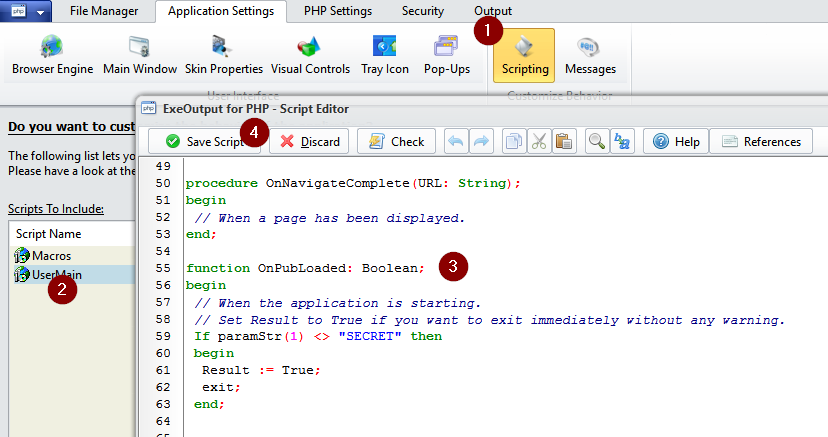
Sure, for ExeOutput, you can do this:


Pasted image828×437 46.4 KB


Copy/paste this code in UserMain script:
function OnPubLoaded: Boolean;
begin
// When the application is starting.
// Set Result to True if you want to exit immediately without any warning.
If paramStr(1) <> “SECRET” then
begin
Result := True;
exit;
end;

Result := False;
end;
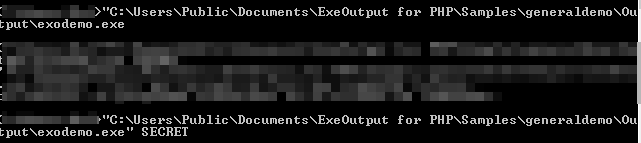
Then it works like this:


Pasted image641×143 2.89 KB


If you pass SECRET in command line, then the EXE opens. Otherwise, it starts and closes.
Feel free to add a message box if you want to warn your users.
 

Attachments

  • blob.png
    blob.png
    46.4 KB · Views: 0
  • blob.png
    blob.png
    2.9 KB · Views: 0
Thank you, very good information. So much one can do with EXEOut:)

The way I am opening the eternal exe files is via links/buttons (sometime menu bar). Use ajax to show button which opens external exe:

heopenext://assets/mathtest1.exe
heopenext://assets/mathtest2.exe
etc…

So I would just use this instead?

heopenext://assets/mathtest1.exe SECRET

Thanks again for your help.
 
gdgsupport said:
Sure, for ExeOutput, you can do this:
Have successfully locked the external exe with your method. Now I cannot get the external exe to run from menu button using:

heopenext://assets/mathtest1.exe SECRET

Have also tried:
Code:
procedure MacroExecuteProgram(filename: String);
var
 EbookPath, MyProgram: String;
begin
 EbookPath := GetGlobalVar("HEPublicationPath", "");
 MyProgram := EbookPath + "assets/mathtest1.exe SECRET";  
 RunAProgram(MyProgram, "", EbookPath, false, SW_SHOWNORMAL);
end;
Then using UserMain.macroexecuteprogram in the HEScript Function.

Failing miserably 🙂
 
Last edited:
Here you go:

Open UserMain and paste this:
Code:
procedure MyExecuteProgram(filename: String; params: String);
var
 EbookPath, MyProgram: String;
begin
 EbookPath := GetGlobalVar("HEPublicationPath", "");
 MyProgram := EbookPath + "assets\" + filename;  
 RunAProgram(MyProgram, params, EbookPath, false, SW_SHOWNORMAL);
end;
Then use links as this one:

hescript://UserMain.MyExecuteProgram|mathtest1.exe|SECRET

As you can see, the function has two parameters. So we pass them separated by |

The code above also supposes that all EXE files are in the assets subfolder. This can be changed the way you want of course.
 
Last edited:
Back
Top