
I'm trying to perform an Application.Activesheet.Protect and I can't seem to get a multiple line statement or even a single line statement to execute. All of the variables below are defined. Here's a couple of examples:
Application.Activesheet.Protect Password:=S_Password, _
DrawingObjects:=S_DrawingObjects, _
Contents:=S_Contents, _
Scenarios:=S_Scenarios, _
UserInterfaceOnly:=S_UserInterfaceOnly, _
AllowFormattingCells:=S_AllowFormattingCells, _
AllowFormattingRows:=S_AllowFormattingRows, _
AllowFormattingColumns:=S_AllowFormattingColumns, _
AllowInsertingColumns:=S_AllowInsertingColumns, _
AllowInsertingRows:=S_AllowInsertingRows, _
AllowInsertingHyperlinks:=S_AllowInsertingHyperlinks, _
AllowDeletingColumns:=S_AllowDeletingColumns, _
AllowDeletingRows:=S_AllowDeletingRows, _
AllowSorting:=S_AllowSorting, _
AllowFiltering:=S_AllowFiltering, _
AllowUsingPivotTables:=S_AllowUsingPivotTables
Even a reduced statement fails:
Application.Activesheet.Protect Password:=S_Password, DrawingObjects:=S_DrawingObjects, Contents:=S_Contents, Scenarios:=S_Scenarios, UserInterfaceOnly:=S_UserInterfaceOnly, AllowFormattingCells:=S_AllowFormattingCells
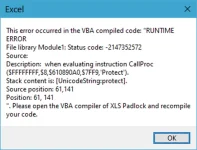
Is there a maximum statement size or some other technique I can use to execute this long statement?
Application.Activesheet.Protect Password:=S_Password, _
DrawingObjects:=S_DrawingObjects, _
Contents:=S_Contents, _
Scenarios:=S_Scenarios, _
UserInterfaceOnly:=S_UserInterfaceOnly, _
AllowFormattingCells:=S_AllowFormattingCells, _
AllowFormattingRows:=S_AllowFormattingRows, _
AllowFormattingColumns:=S_AllowFormattingColumns, _
AllowInsertingColumns:=S_AllowInsertingColumns, _
AllowInsertingRows:=S_AllowInsertingRows, _
AllowInsertingHyperlinks:=S_AllowInsertingHyperlinks, _
AllowDeletingColumns:=S_AllowDeletingColumns, _
AllowDeletingRows:=S_AllowDeletingRows, _
AllowSorting:=S_AllowSorting, _
AllowFiltering:=S_AllowFiltering, _
AllowUsingPivotTables:=S_AllowUsingPivotTables
Even a reduced statement fails:
Application.Activesheet.Protect Password:=S_Password, DrawingObjects:=S_DrawingObjects, Contents:=S_Contents, Scenarios:=S_Scenarios, UserInterfaceOnly:=S_UserInterfaceOnly, AllowFormattingCells:=S_AllowFormattingCells
Is there a maximum statement size or some other technique I can use to execute this long statement?
