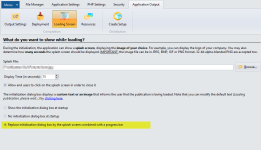
V2018 bug loading screen

gdgsupport said:
Of course, if we manage to find a way to show the splash screen sooner, we’ll do it.
@gdgsupport This is starting to be an issue. Updated a few software’s and used V2018. Users are even noticing this issue as startup time takes longer than V2, and without a splash screen, many think there is an issue with software.

So, the solution for now is to use V2 and put V2018 to bed until this is fixed?
 
gdgsupport said:
Or just don’t disable the “Loading app, please wait…” dialog box.
Hard to do have spending time & money on creating professional splash graphics. The built-in dialog box looks like something from Windows 3 era.
 
@gdgsupport I do not wish to bug you about the splash screen issue but kind of important in my world, maybe not yours, but it is in mine.

Before I convert / recompile my projects back to V2 (like dummy converted most to V2018 b4 fully testing for issues), like to ask if this will be fixed anytime soon?

Teachers are not issued fast computers and loading time for V2018 is longer for them. Many are thinking software not working and causing me LOTS of headaches.
 
Last edited:
gdgsupport said:
Sure, it will be fixed in the incoming V2018.1. Should be a matter of days.

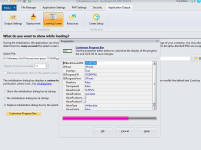
We also extended the loading screen with a new option to show a progress bar at the bottom
Wonderful, great news! Thank you.
 
Sure, you’ll have customization options. However, width is automatically calculated.

image
 
Last edited:
Gosh I hate to be asking again @gdgsupport but… Either got to convert some apps back to V2 or have working V2018 for splash screen.

If going to be more days, please let me know so can get to work converting.

Thanks.
 
V2018.1 working much, much better and the progress bar is a very nice feature.

One note and not really big deal, just letting you know: When exiting / closing software the splash screen appears in brief flash. Again, not a big deal.

Thanks for fixing and adding the progress bar!

EDIT / UPDATE: Seems using exit confirmation script is causing the splash screen to briefly appear when clicking Yes. If you click No, splash screen appears with progress bar and stays.

Here is my scripting if you wish to try to replicate:

function OnWindowCloseQuery (WindowName: String): Boolean;
begin
// When a window is closed by the user.
// Ask user if they really wish to close window
Result := True;
if MessageBox(“Exit Software?”#13#10#13#10"Save Your Work Sheet? Click Yes to Exit!"#13#10#13#10"No to Cancel & Then Go Save…",
“Exit Confirmation”, MB_YESNO+MB_ICONWARNING) = IDNO then Result := False;
end;

 
Last edited:
oldteacher said:
function OnWindowCloseQuery (WindowName: String): Boolean;

begin

// When a window is closed by the user.

// Ask user if they really wish to close window

Result := True;

if MessageBox(“Exit Software?”#13#10#13#10"Save Your Work Sheet? Click Yes to Exit!“#13#10#13#10"No to Cancel & Then Go Save…”,

“Exit Confirmation”, MB_YESNO+MB_ICONWARNING) = IDNO then Result := False;

end;
Thanks for the report! We’ll fix that in next update.
 
Back
Top