
You are using an out of date browser. It may not display this or other websites correctly.
You should upgrade or use an alternative browser.
You should upgrade or use an alternative browser.
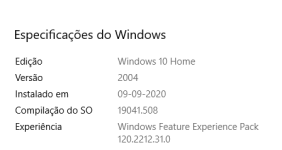
Two customers EXE file not working. New Windows build 19041 in common
- Thread starter ricdam
- Start date

Since she is using Excel 2010, no need to use the myworkbook.xlpath trick.
But @Ikern, please first confirm that you built your EXE file with XLS Padlock 2020.1. A lot of customers fixed their Windows 10 build 19041 problem for their own users by upgrading to XLS Padlock 2020.1.
But @Ikern, please first confirm that you built your EXE file with XLS Padlock 2020.1. A lot of customers fixed their Windows 10 build 19041 problem for their own users by upgrading to XLS Padlock 2020.1.
I am using 2019.0.
My problem with upgrading at this point, for this client, is that she will lose all of her custom changes to the spreadsheet she has now because she has not backed up lately.
I sent her instructions for temporarily uninstalling the update so she can open and backup her stuff. I haven’t heard back as to whether or not that worked for her to open my program.
My problem with upgrading at this point, for this client, is that she will lose all of her custom changes to the spreadsheet she has now because she has not backed up lately.
I sent her instructions for temporarily uninstalling the update so she can open and backup her stuff. I haven’t heard back as to whether or not that worked for her to open my program.
Then she will need to uninstall 365 by going to Microsoft website (download the Microsoft 365 removal tool from the Microsoft website, then run it) then Office 2010 should then be the default Excel.
She may also need to do a repair of the Office 2010 if needed to associate files.
That is what I had to do with my users.
Also the new 2020.1 would definitely help you as it should fix the problem if not able to run with Office 2010. The above solution is only needed if 365 got installed and now is the default Excel.
She may also need to do a repair of the Office 2010 if needed to associate files.
That is what I had to do with my users.
Also the new 2020.1 would definitely help you as it should fix the problem if not able to run with Office 2010. The above solution is only needed if 365 got installed and now is the default Excel.
Last edited:
Also, have them close out of ‘Chrome’ if open (many users have Chrome running to check their Gmail).
(I’ve had several users report that the files won’t open when Chrome is open, or running)
Also, make sure they are not on a network or using a ‘virtual desktop’ as we had several users report unable to open with those configs.
Regarding the update, you can be sure that the 2020.1 is fine and you can compile and still open the older .xlsc files. (I was relectant myself as I did a 2019.1 update once and I found that I couldn’t open older .xlsc files! and had to go back to 2019.0) - not a problem with 2020.1 thankfully!
(I’ve had several users report that the files won’t open when Chrome is open, or running)
Also, make sure they are not on a network or using a ‘virtual desktop’ as we had several users report unable to open with those configs.
Regarding the update, you can be sure that the 2020.1 is fine and you can compile and still open the older .xlsc files. (I was relectant myself as I did a 2019.1 update once and I found that I couldn’t open older .xlsc files! and had to go back to 2019.0) - not a problem with 2020.1 thankfully!
3 more users this week reporting they cannot open the program, it just gets stuck at the welcome screen.
The common denominator this time seems that they are all using Surface Pro laptops and most are using Office 2010 (32-bit)
So Is Microsoft doing something to their Surface Pro users (since they own both the software and hardware) to force the Excel App?
They can still open their Excel program and their .xls files just fine.
Our .exe and .xlsc files will no longer open!
The common denominator this time seems that they are all using Surface Pro laptops and most are using Office 2010 (32-bit)
So Is Microsoft doing something to their Surface Pro users (since they own both the software and hardware) to force the Excel App?
They can still open their Excel program and their .xls files just fine.
Our .exe and .xlsc files will no longer open!
Last edited:
That’s a rather interesting discover, and this explains why we could not reproduce the problem.TheUser said:The common denominator this time seems that they are all using Surface Pro laptops and most are using Office 2010 (32-bit)
Do you know which Surface Pro version? Thus, we could acquire one and see the problem ourselves.