
You are using an out of date browser. It may not display this or other websites correctly.
You should upgrade or use an alternative browser.
You should upgrade or use an alternative browser.
tried to run an HTML program to compile but get the following fatal errors and no exe file
- Thread starter Novato
- Start date

This error indicates that your antivirus probably blocked the creation of the temporary EXE file. Are you using an antivirus software?
Here is the whole compilation effort.
It is just a little HTML built up to test some future ideas.
HTML Executable can't compile. Why?
HTML Executable Compilation Log Version: 2025.0.1
Publication Information: - Selected rendering engine: WebView2
- Title: Tarjeta de Navidad 2025
- Company:
- Date/Time: 1/25/2026 3:39:27 PM
Reading Parameters... Checking publication settings...
Preprocessing source file lists...
First check done: the compilation may continue.
Compressing Files... Listing files to be compressed...
Beginning file compression...
Notation: U=Uncompressed Size, C=Compressed Size (in bytes).
File List:
E:\prueba-1\25Xmas.jpg, U: 481251, C: 451206
E:\prueba-1\feliznavi25.mp3, U: 925346, C: 924739
E:\prueba-1\feliznavi25.ogg, U: 799841, C: 798282
E:\prueba-1\tarjeta_25.html, U: 1758, C: 754
File compression done.
Number of files: 4
Total uncompressed size: 4416392 byte(s)
Total compressed size: 2174981 byte(s)
Compression ratio: 51%
Writing Publication... Writing publication basic settings...
Writing language table...
Compiling skin data files...
Processing file properties...
Processing map IDs...
Collecting internal resources...
Generating data for the Search Engine:
Default charset: UTF-8
- Parsing HTML pages to collect keywords...
- Parsing DOCX files to collect keywords...
- Generating index for the search engine...
1 file(s) were indexed.
Search Index Size (in bytes): 366
Generating data for navigation panels and menus:
- Favorites Panel...
- Image Resources...
Compiling scripts for the publication:
Compiling UI items for the application...
- Menu bar...
- Navigation bar...
- Context Menu...
- Main Script...
- Localization Script...
- Global Commands Script...
- Search Engine Script...
- Favorite Manager Script...
- Internal HTML Dialog Scripts:
o dlgaddfavorite.hex
o dlgabout.hex
- User Scripts:
o Script "UserMain"...
o Script "Macros"...
All scripts were compiled and linked.
Generating publication final data...
Generating publication executable file...
- Generating EXE resources...
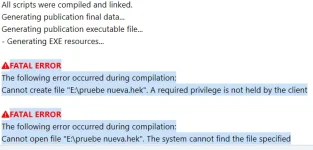
FATAL ERROR
The following error occurred during compilation:
Cannot create file "E:\tarjeta_25.hek". A required privilege is not held by the client
FATAL ERROR
The following error occurred during compilation:
Cannot open file "E:\tarjeta_25.hek". The system cannot find the file specified
What do I need to do to solve these fatal errors?
I need to find a solution to work on a family history project I have coded in HTML.
Novato.
It is just a little HTML built up to test some future ideas.
HTML Executable can't compile. Why?
HTML Executable Compilation Log Version: 2025.0.1
Publication Information: - Selected rendering engine: WebView2
- Title: Tarjeta de Navidad 2025
- Company:
- Date/Time: 1/25/2026 3:39:27 PM
Reading Parameters... Checking publication settings...
Preprocessing source file lists...
First check done: the compilation may continue.
Compressing Files... Listing files to be compressed...
Beginning file compression...
Notation: U=Uncompressed Size, C=Compressed Size (in bytes).
File List:
E:\prueba-1\25Xmas.jpg, U: 481251, C: 451206
E:\prueba-1\feliznavi25.mp3, U: 925346, C: 924739
E:\prueba-1\feliznavi25.ogg, U: 799841, C: 798282
E:\prueba-1\tarjeta_25.html, U: 1758, C: 754
File compression done.
Number of files: 4
Total uncompressed size: 4416392 byte(s)
Total compressed size: 2174981 byte(s)
Compression ratio: 51%
Writing Publication... Writing publication basic settings...
Writing language table...
Compiling skin data files...
Processing file properties...
Processing map IDs...
Collecting internal resources...
Generating data for the Search Engine:
Default charset: UTF-8
- Parsing HTML pages to collect keywords...
- Parsing DOCX files to collect keywords...
- Generating index for the search engine...
1 file(s) were indexed.
Search Index Size (in bytes): 366
Generating data for navigation panels and menus:
- Favorites Panel...
- Image Resources...
Compiling scripts for the publication:
Compiling UI items for the application...
- Menu bar...
- Navigation bar...
- Context Menu...
- Main Script...
- Localization Script...
- Global Commands Script...
- Search Engine Script...
- Favorite Manager Script...
- Internal HTML Dialog Scripts:
o dlgaddfavorite.hex
o dlgabout.hex
- User Scripts:
o Script "UserMain"...
o Script "Macros"...
All scripts were compiled and linked.
Generating publication final data...
Generating publication executable file...
- Generating EXE resources...
FATAL ERROR
The following error occurred during compilation:
Cannot create file "E:\tarjeta_25.hek". A required privilege is not held by the client
FATAL ERROR
The following error occurred during compilation:
Cannot open file "E:\tarjeta_25.hek". The system cannot find the file specified
What do I need to do to solve these fatal errors?
I need to find a solution to work on a family history project I have coded in HTML.
Novato.
Tried to compile another HTML file but it will not complete.
FATAL ERROR
The following error occurred during compilation:
Cannot create file "C:\ad-one.hek". Access is denied
FATAL ERROR
The following error occurred during compilation:
Cannot open file "C:\ad-one.hek". The system cannot find the file specified
Also, I would like to know how to bypass the "Enter your company Name," since there is no company involved. It is all family history.
FATAL ERROR
The following error occurred during compilation:
Cannot create file "C:\ad-one.hek". Access is denied
FATAL ERROR
The following error occurred during compilation:
Cannot open file "C:\ad-one.hek". The system cannot find the file specified
Also, I would like to know how to bypass the "Enter your company Name," since there is no company involved. It is all family history.
Thank you for providing the full compilation log. The issue is not related to your HTML content. Your compilation progresses correctly until the very last step, where HTML Executable attempts to generate its internal build file (.hek). The fatal errors you see are caused by Windows permission restrictions, not by a problem in your project.
This happens when:
or
C:\Users\your-username\Desktop\
If the problem persists:
You may:
This field is informational only (used in version metadata and About dialogs). It has no licensing or functional impact.
1. Why the compilation fails
The key error messages are:- “A required privilege is not held by the client”
- “Access is denied”
- Cannot create file E:\tarjeta_25.hek
- Cannot create file C:\ad-one.hek
This happens when:
- The output folder is a protected location (such as C:\ or the root of another drive like E:\)
- Security software (Windows Defender / antivirus) blocks executable generation
2. How to solve the fatal errors (step by step)
Solution A (recommended): Change the output folder
- Open Application Output in HTML Executable
- Change the output EXE path to a folder such as:
or
C:\Users\your-username\Desktop\
- Make sure the folder already exists
- Compile again
Solution B: Antivirus / Windows Defender
If the problem persists:
- Temporarily disable real-time protection
- Or add HTML Executable to your antivirus exclusion list
3. About the “Company Name” field
You do not need a company to use HTML Executable.You may:
- Enter your family name
- Enter your personal name
- Or enter something generic, such as:
This field is informational only (used in version metadata and About dialogs). It has no licensing or functional impact.