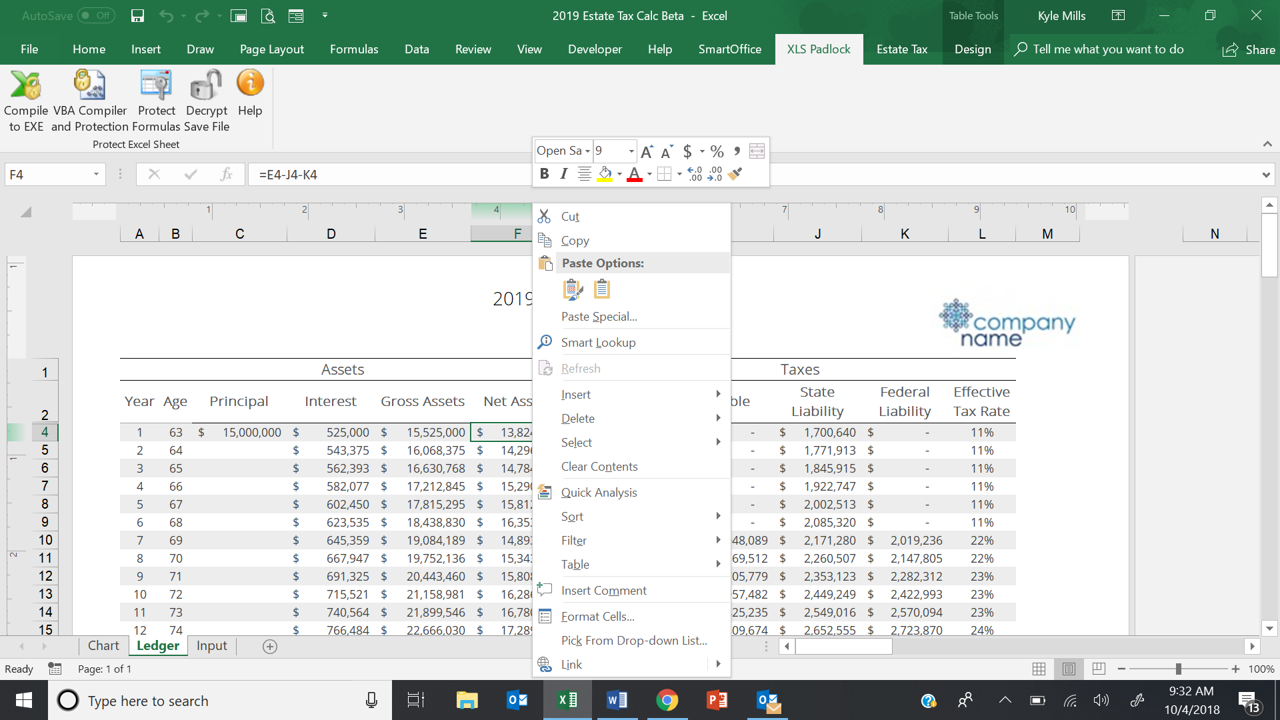
K kgmills New member Oct 2, 2018 #1 When I right-click in workbook, the Excel menu does not show the XLS Padlock options to protect cells.
When I right-click in workbook, the Excel menu does not show the XLS Padlock options to protect cells.
gdgsupport Support Staff member Oct 3, 2018 #2 Do you see the “XLS Padlock” ribbon? Could you take a screenshot of your popup menu when you right click?
Do you see the “XLS Padlock” ribbon? Could you take a screenshot of your popup menu when you right click?
K kgmills New member Oct 4, 2018 #3 Yes, I can see the ribbon. Screen shot attached. I am using a trial version at the moment. Padlock Screen.png1280×720 251 KB Attachments Padlock Screen.png 251.4 KB · Views: 0 Last edited: Oct 4, 2018
Yes, I can see the ribbon. Screen shot attached. I am using a trial version at the moment. Padlock Screen.png1280×720 251 KB
gdgsupport Support Staff member Oct 5, 2018 #4 Could you try these steps: https://excel.tips.net/T003452_Problem_with_Missing_Context_Menu_Option.html
Could you try these steps: https://excel.tips.net/T003452_Problem_with_Missing_Context_Menu_Option.html