as.research84
New member
Dear Support,
I have downloaded the trial version and trying to compile and run the program me but i am constantly getting the following error:
https://drive.google.com/file/d/0B6CVVyvsXXzlMDBrWml6LVVDSC1YMXYxSzZSd2FwVDdSSm9r/view
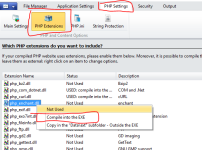
which says; that the DLL file is not being found, while i have checked and double checked and its there. We have also tried the embedding in EXE option and it is also giving the same error. Kindly help.
I have downloaded the trial version and trying to compile and run the program me but i am constantly getting the following error:
https://drive.google.com/file/d/0B6CVVyvsXXzlMDBrWml6LVVDSC1YMXYxSzZSd2FwVDdSSm9r/view
which says; that the DLL file is not being found, while i have checked and double checked and its there. We have also tried the embedding in EXE option and it is also giving the same error. Kindly help.