Open external File with default application

Fenoma

New member
Im trying to set a script to open a file with the default application of windows. I have some Powerpoint files that i need to open with the microsoft app and im using this:

procedure OpenAFile(FilePath: String);
var
res: integer;
begin
res := OpenFile(FilePath, “”, SW_SHOWNORMAL);
if res < 32 then
begin
MessageBox("Error al abrir el archivo: " + FilePath + ". Código de error: " + inttostr(res), “Launch Error”, MB_OK + MB_ICONERROR);
exit;
end;
end;

And in Javascript this:

const openExternalFile = (relativePath) => {
Code:
// Call the original HEScript function without any modification
exeoutput.RunHEScriptCode(`OpenAFile("${relativePath}");`);
}

but i get the error: "Unknown method or routine: ‘OpenAFile’. Im using exeoutput 2021.

What Am i doing wrong? Thanks
 
Maybe the “” in OpenFile, try "":
Code:
procedure OpenAFile(FilePath: String);
var
res: integer;
begin
res := OpenFile(FilePath, "", SW_SHOWNORMAL);
if res < 32 then
begin
MessageBox("Error al abrir el archivo: " + FilePath + ". Código de error: " + inttostr(res), “Launch Error”, MB_OK + MB_ICONERROR);
exit;
end;
end;

And in Javascript this:

const openExternalFile = (relativePath) => {

// Call the original HEScript function without any modification
exeoutput.RunHEScriptCode(`OpenAFile("${relativePath}");`);
}
Sidenote, this always comes in handy too:

heopenit:// + [virtual path] to the file you want to open with the external application associated with its filetype (for example, heopenit://mydoc.doc will extract and open mydoc.doc in Microsoft Word).

heopenit:// can be used for any document file such as executable program files, text files, Microsoft Office® files, etc, that are compiled in the EXE. These files are listed in the File Manager.
Code:
<a href="heopenit://mydocument.docx">Open this Word document</a>
heopenext:// can be used for any document file such as executable program files, text files, Microsoft Office® files, etc. These files are available outside the application , in the same folder as the EXE file.
Code:
<a href="heopenext://myprogram2.exe">Start another application</a>
This of course is not using scripting in UserMain but may be of some help to you.
 
Last edited:
oldteacher said:
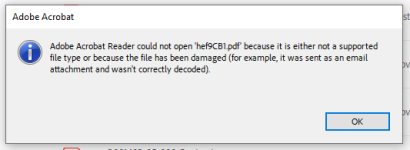
Hi OldTeacher, thanks for the reply. The problem is not about syntax. Actually when I include it in the UserMain script, it doesn’t alert any syntax issue and save it without problem. The problem is that Exeoutput doesn’t recognize the procedure (Unknown Method). I also tried with heopenit and it corrupts the file, and change the name. I guess because of the VFS. So when I open the file, the default software (in this case acrobat reader) alerts:

image

The original filename is 10.pdf and is changed for a temporary name “hef9CB1.pdf”. What I need is to figure it out why Exeoutput is not recognizing the procedure. And the files must be opened by Acrobat Reader because they have attached a 3D interactive model that any pdf reader can load.
 
Very interesting. Never had this issue and we do a lot of PDFs in the classroom environment.

Best if @gdgsupport handles this one. they will most likely need your project code to fully understand what is happening. Very hard to troubleshoot without.
 
Hi thanks for the reply. Yes I figure that could be missing the UserMain, but still getting the same error. It’s really strange, because I use other procedures like MinimizeWindow: exeoutput.RunHEScriptCom(“UserMain.MinimizeWindow”); and works perfect, but for some reason any new script that I add after that one is not recognized. Even I try to just print a message : exeoutput.RunHEScriptCode(‘UserMain.TestDebug();’); and got the same error of “Unknown method”. At the end I decided to solve it with PHP: shell_exec(“start /wait "" "$filePath"”); and it did work. Thanks both for your help, I really appreciate the time. If you figure it out the problem, still would be great to know .Cheers!
 
Thanks for the follow-up.
RunHEScriptCom must not contain parenthesis:
exeoutput.RunHEScriptCode(‘UserMain.TestDebug();’);
is wrong
exeoutput.RunHEScriptCode('UserMain.TestDebug');
is correct.
To pass an argument, use |
exeoutput.RunHEScriptCode('UserMain.TestDebug|argument 1');
 
Back
Top