
Hi.
I created a custom ribbon for my compiled notebook and checked the “Disable all ribbons and toolbars” option.
Within my custom ribbon, I included the “Open”, “Open Recent”, and “Sheet Protection” icons that are used in Excel.
After compiling my workbook, these 2 Ribbon items do not work. The “Open” and “Sheet Protection” icons are greyed out and the “Open Recent” button is visible, but it does not pull up the menu of recent items when pressed.
Here are the options I have active in XLS Padlock:
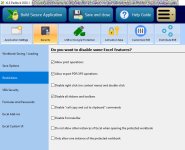
What do I need to do to make these icons work after compiled? They work before compiling.
I created a custom ribbon for my compiled notebook and checked the “Disable all ribbons and toolbars” option.
Within my custom ribbon, I included the “Open”, “Open Recent”, and “Sheet Protection” icons that are used in Excel.
After compiling my workbook, these 2 Ribbon items do not work. The “Open” and “Sheet Protection” icons are greyed out and the “Open Recent” button is visible, but it does not pull up the menu of recent items when pressed.
Here are the options I have active in XLS Padlock:
What do I need to do to make these icons work after compiled? They work before compiling.
Last edited:
