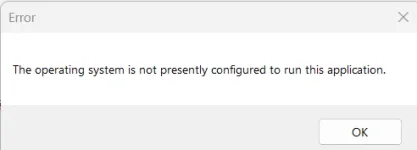
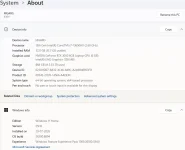
Yes, your machine is perfectly suitable. An i7-13650HX with 32 GB of RAM on 64-bit Windows with an x64 processor is well above what XLS Padlock needs, and the "System type" line settles the important question: this is not the ARM limitation. So we can set that aside entirely and look at the environment instead.
That points at security software interfering with the protected code as it starts, and one detail in your first message supports it strongly: you wrote that the application works when you run it a second time. A block that disappears on the second launch is the classic signature of an on-access scanner inspecting files that have just been extracted. The first launch loses the race, the second one finds everything already in place.
There is one specific thing to try, and it is new information since our last reply here. Another customer had a related startup failure on a corporate machine, and his IT team found that Microsoft Defender was blocking one particular file:
XLSPadlockLoad64.exe
That is the XLS Padlock loader, not your own compiled EXE. It matters because the usual advice, "exclude the application EXE and its folder", does not cover it, which is exactly why the block kept happening in his case. So please add an antivirus exclusion for
XLSPadlockLoad64.exe (and
XLSPadlockLoad32.exe if you build 32-bit), alongside your compiled EXE and its folder. While you are there, open Windows Security, then Virus and threat protection, then Protection history, and see whether anything was blocked or removed at the moment you launched.
Two things would help us narrow it down further:
- Does it happen on one machine only, or on several?
- Which antivirus or security suite is running on the affected machine?
Finally, the question you asked at the very start, which is the one that really matters: what happens to your end users. It is a fair worry, and the honest answer is that this class of problem depends on each user's security software rather than on your build. The strongest thing you can do about it is exactly what you are working on in your other thread: sign your compiled EXE. A signed application carries a publisher identity, and behavioural engines treat it far less aggressively than an unsigned executable that has just appeared on the disk. It will not eliminate every case, but it is the single measure that helps across all your users at once, so it is worth getting that signing working.