Minimize main windows via script

cyraxchel

New member
Hello.
I want show video, that stored outside my biuld. I call script, wich open video using my player. But main app windows stay on top (option set in publication settings and it must be enabled) and it overlaps video.
Is there way programmatically minimize main app window? Using HEScript or JS from my html page?
 
You can use the same code as shown here:
5_f40856482fe1e45ac8f1605885140a2d.png
[SOLVED] Want to minimize active Window How to (ExeOutput)
I kind of have it working!!! I put this in the UserMain file: function GetActiveWindow(): LongWord; external "[email protected] stdcall"; function ShowWindow(hWnd : LongWord; nCmdShow : LongWord): LongWord; external "[email protected] stdcall"; Const SW_MINIMIZE = 6; procedure Minimize; var hWnd : Longint; begin hWnd := GetActiveWindow(); ShowWindow(hWnd, SW_MINIMIZE); end; Then I call in the PHP like this: exo_runhescriptcom ("UserMain.Minimize"); The only thing is that …
 
I modified this script, because it show Syntax Errors.
New script:
Code:
Const       
 SW_MINIMIZE = 6;  
function GetActiveWindow : LongWord; external "[email protected] stdcall";      
function ShowWindow(hWnd : LongWord; nCmdShow : LongWord): LongWord; external "[email protected] stdcall";

procedure Minimize;
var    hWnd : Longint;
begin                         
hWnd := GetActiveWindow();
ShowWindow(hWnd, SW_MINIMIZE);
end;
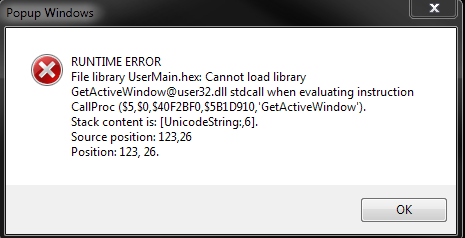
When I call Minimize, i resieve Runtime error:

Error.png465×238 14.4 KB


How correctly load external dll?
In samples for Deplhi linking make like in this sample:
function GetWindowTextW; external user32 name 'GetWindowTextW';

Or like this:
Code:
function GetWindowDC(Wnd: HWnd); HDC; 
stdcall; external 'user32.dll' name 'GetWindowDC';
I try load in this style:
function GetActiveWindow : LongWord; stdcall; external "user32.dll" name "GetActiveWindow";

But in htmlExe script editor show syntax error.

Or need do something else?
 

Attachments

  • Error.png
    Error.png
    14.4 KB · Views: 0
It’s a strange syntax here. Try with
external "user32.dll" name 'GetActiveWindow'
Note the different " and ’ characters… 😔
 
Back
Top