
andrzejwikto
New member
I select "Favorite." A small window appears on the right side of the screen. Then I want to add the current HTML page to Favorites (after selecting "Add Favorite" in the window - the dialog box shown below appears). This text box already contains the name of the current HTML document, enclosed in <title></title>. How can I prevent
this name from appearing in this text box?
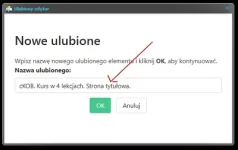
this name from appearing in this text box?

