Exeoutput not compatible with Win 11 last update KB5046740

Krokus

New member
Tested with ExeOutput version: 2024.1.2 - Win 11 // Build: 26100.2454

All applications compiled with exeoutput (all versions) do not work on win 11 after the latest operating system update.
1

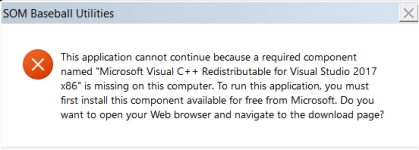
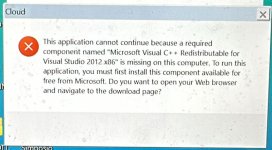
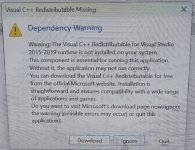
The error is always the same: Visual C++ is missing (even if this is present on the system).

I have deleted and reinstalled Visual C++ in the required version, i have uninstalled and installed the update but the problem is still identical.

Currently the only way to make the applications work is to delete the latest Windows 11 update “KB5046740”
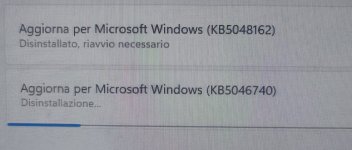
4

Sooner or later all exeoutput users will find themselves in this situation. How can we solve the problem?
 

Attachments

  • 2.jpg
    2.jpg
    75.9 KB · Views: 0
I confirm that it also works for version 2024.0.
Once the update was removed, operation resumed normally.
Solutions for our users?
 
We are working on this issue, we finally were able to reproduce it. It is due to a new Preview update Microsoft released some days ago for Windows 11 24H2 users:
KB5046740

The provider of the faulty component we are using has been advised too and they are working on the issue too.

Hopefully, we’ll get a fix very soon. The sole workaround currently confirmed by users is to roll back Windows to remove that specific update.
Since it is a Preview update, it is also possible that Microsoft may change it too.

Thank you for your patience.
 
Hi, over 50% of our customers are unable to use the software compiled with exeoutput.

We have replaced some cloud systems by compiling the free system “electron”.

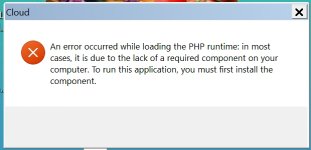
Now, there are also problems with the php as the attached image.

errore_php

Could you please specify us if this problem can be resolved and when it can be resolved.

Thank you
 
Yes, our users are getting this:
image

Some users have installed the component but problem still exists.
 
Last edited:
For all users with ExeOutput 2024.1, here is a fix candidate for you to test with your project:

https://download.exeoutput.com/tmp/EXORunFixKB.7z

Unpack the archive to a local folder and move the EXORun.dat file to this folder:

C:\Program Files (x86)\GDG Software\ExeOutput for PHP 2024\CEFRuntime

Make a backup of the existing file in case of.

Then, start ExeOutput again and compile your project.

If your project works again on Windows 11 with KB5046740, please report it here. If not, please also do it.

PRECISION: this fix is only for GUI apps. If it works, we’ll release an entire update for ExeOutput for PHP, that will include console apps.

Thank you all for your help and feedback!
 
Last edited:
Well, update is not working on version 2021, it says error : EXUBERANT_NIBBLE (2024.1.3)
I will have to wait, to update to last version …

Thank-you,
Gilbert
 
Applied the fix but my compiled exe is now twice the size as the previous. I have yet to dig into why this is happening, but is it a result of the fix or possibly something else?
 
One of my apps didn’t run under windows 11 24H2. After installing the hotfix and recompiling the program, it works. The size of the program has increased.
We are looking forward to the console hotfix.
 
webguy22 said:
exe is now twice the size as the previous. I have yet to dig into why this is happening, but is it a result of the fix or possibly somethin
Strange. Do you have size values available to post here?
 
Back
Top