Does Workbook open event work in compiled workbook?

Status
Not open for further replies.

Golfer65

New member
In my workbook open event I have a call to a sub to change the icon of my sheet excel. That also dont work which make me think events are disabled ?

can you confirm this ?

Workbook open event
Call ChangeIcon >>>>>>this works in normal Excel but not in compiled exe thus my question
 
Last edited:
Workbook open event works fine except if you disable events yourself with
Application.EnableEvents = False
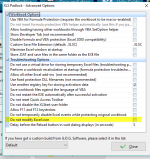
Try this if it helps:
image
 
From my understanding if you tick it that will not allow you to modify it? Tried both not working

What have changed ? Its working correctly in an excel xlsm file but not in your compiled exe.Tried that can confirm this is NOT WORKING on your compiled exe
 
Last edited:
Please post your code for ChangeIcon.
We can also confirm that Workbook_Open works and is properly called in an EXE file.
 
Last edited:
Ok here is my code Support. My Icon is “Icon.ico”-Thank you

Sub ChangeExelIcon()
Code:
'Get the icon handle.
'You can use the full path of the icon file, i.e.:
hwndIcon = ExtractIconA(0, "C:\Users\Christos\Desktop\MyApp\Icon.ico", 0)
'Or the icon path relative to the current workbook, i.e.:
'hwndIcon = ExtractIconA(0, ThisWorkbook.Path & "\$SIGN.ico", 0)
 
'Check if the icon handle is valid.
If hwndIcon <> 0 Then

    'Change the icon.
    'For a big icon (32 x 32 pixels), use this line:
    'SendMessageA Application.HWnd, WM_SETICON, ICON_BIG, hwndIcon
    'For a small one (16 x 16 pixels), use the next line (typical case):
    SendMessageA Application.hWnd, WM_SETICON, ICON_SMALL, hwndIcon
    
    'Inform the user.
    'MsgBox "Excel icon was changed successfully!", vbInformation, "Done"

End If
End Sub

Did some investigating of my own and put the macro in the vb compiler -line 26 is also giving an error which is this line
SendMessageA Application.hWnd, WM_SETICON, ICON_SMALL, hwndIcon
So its not happy about something there ???
 
Last edited:
Golfer65 said:
'hwndIcon = ExtractIconA(0, ThisWorkbook.Path & “$SIGN.ico”, 0)
Put this code in a separate module
'---------------------------------------------
Option Explicit

Declare Function FindWindow Lib “user32” Alias “FindWindowA” (ByVal ClassName As String, ByVal WindowName As String) As Long
Declare Function ExtractIcon Lib “shell32.dll” Alias “ExtractIconA” (ByVal Instance As Long, ByVal ExeFileName As String, ByVal IconIndex As Long) As Long
Declare Function SendMessage Lib “user32” Alias “SendMessageA” (ByVal hWnd As Long, ByVal Message As Long, ByVal wParam As Integer, ByVal lParam As Long) As Long
Const WM_SETICON = &H80
Public Function PathToFile(filename As String)
Dim XLSPadlock As Object
On Error GoTo Err
Set XLSPadlock = Application.COMAddIns(“GXLSForm.GXLSFormula”).Object
PathToFile = XLSPadlock.PLEvalVar(“EXEPath”) & filename
Exit Function
Err:
PathToFile = “”
End Function
Public Sub SetExcelIcon(ByVal IconPath As String)
Dim A As Long
Dim hWnd As Long
Dim hIcon As Long

hWnd = FindWindow(“XLMAIN”, Application.Caption)
hIcon = ExtractIcon(0, IconPath, 0)

If hIcon > 1 Then
Call SendMessage(hWnd, WM_SETICON, True, hIcon)
Call SendMessage(hWnd, WM_SETICON, False, hIcon)
End If
End Sub
Public Sub ChangeExcelIcon()

'The call below works fine when you explictly define the path to the file
'Call SetExcelIcon(“C:\Users\Christos\Desktop\MyApp\Icon.ico”)

'If you want to use excel’s “ThisWorkbook.path” you would need to
'call XLS function as described below.
'this line would have to be changed to call XLS Function PathToFIle
'hwndIcon = ExtractIconA(0, ThisWorkbook.Path & “$SIGN.ico”, 0)

Dim file_name As String
file_name = “$SIGN.ico”
Call SetExcelIcon(PathToFile(file_name))

End Sub

 
Thank you for your response to this question FTSC-PB…I have put it in a new module but its unclear to me where I must go update the path…ONLY on the declare function part above

PathToFile = XLSPadlock.PLEvalVar(“EXEPath”) & filename
Exit Function
Err:
PathToFile = “” OR

or do I change it in the sub below Public Sub ChangeExcelIcon()
Call SetExcelIcon(PathToFile(file_name))

In my workbook open event I call

Call ChangeExcelIcon

Thanks for your help
 
Last edited:
FTSC-PB said:
Public Sub ChangeExcelIcon()

'The call below works fine when you explictly define the path to the file

’Call SetExcelIcon(“C:\Users\Christos\Desktop\MyApp\Icon.ico”)

'If you want to use excel’s “ThisWorkbook.path” you would need to

’call XLS function as described below.

'this line would have to be changed to call XLS Function PathToFIle

’hwndIcon = ExtractIconA(0, ThisWorkbook.Path & “$SIGN.ico”, 0)

Dim file_name As String

file_name = “$SIGN.ico”

Call SetExcelIcon(PathToFile(file_name))

End Sub
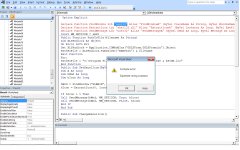
Get an error
error
 
FTSC-PB said:
Option Explicit

Declare Function FindWindow Lib “user32” Alias “FindWindowA” (ByVal ClassName As String, ByVal WindowName As String) As Long

Declare Function ExtractIcon Lib “shell32.dll” Alias “ExtractIconA” (ByVal Instance As Long, ByVal ExeFileName As String, ByVal IconIndex As Long) As Long

Declare Function SendMessage Lib “user32” Alias “SendMessageA” (ByVal hWnd As Long, ByVal Message As Long, ByVal wParam As Integer, ByVal lParam As Long) As Long

Const WM_SETICON = &H80

Public Function PathToFile(filename As String)

Dim XLSPadlock As Object

On Error GoTo Err

Set XLSPadlock = Application.COMAddIns(“GXLSForm.GXLSFormula”).Object

PathToFile = XLSPadlock.PLEvalVar(“EXEPath”) & filename

Exit Function

Err:

PathToFile = “”

End Function

Public Sub SetExcelIcon(ByVal IconPath As String)

Dim A As Long

Dim hWnd As Long

Dim hIcon As Long

hWnd = FindWindow(“XLMAIN”, Application.Caption)

hIcon = ExtractIcon(0, IconPath, 0)

If hIcon > 1 Then

Call SendMessage(hWnd, WM_SETICON, True, hIcon)

Call SendMessage(hWnd, WM_SETICON, False, hIcon)

End If

End Sub

Public Sub ChangeExcelIcon()

'The call below works fine when you explictly define the path to the file

’Call SetExcelIcon(“C:\Users\Christos\Desktop\MyApp\Icon.ico”)

'If you want to use excel’s “ThisWorkbook.path” you would need to

’call XLS function as described below.

'this line would have to be changed to call XLS Function PathToFIle

’hwndIcon = ExtractIconA(0, ThisWorkbook.Path & “$SIGN.ico”, 0)

Dim file_name As String

file_name = “$SIGN.ico”

Call SetExcelIcon(PathToFile(file_name))

End Sub
Frederick,

For reasons unknown when you copied the code I posted into an Excel module, all of its quotes " changed to something different and all of the ’ changed also. Go through all of the code and replace all of the quotes " and all of the ’ apostrophe’s. You need not change any code in the XLS function “Public Function PathToFile(filename As String)”. Fix the code as mentioned and try again and yes you call the ChangeExcelIcon from your workbook_open event.
 
Compiled it no error but it doesnt change the icon -Also you declared it Public Sub…if i compile it publicly it gives an error on the workbook open event - I had to go change from public sub just to sub to stop that error

Public Function PathToFile(filename As String)
Code:
Dim XLSPadlock As Object

On Error GoTo Err

Set XLSPadlock = Application.COMAddIns("GXLSForm.GXLSFormula").Object

PathToFile = XLSPadlock.PLEvalVar("C:\Program Files\Test\Test.exe & $SIGN.ico")

Exit Function
Err:
Code:
PathToFile = "C:\Program Files\Test\Test.exe & $SIGN.ico"

End Function

Public Sub SetExcelIcon(ByVal IconPath As String)

Dim A As Long

Dim hWnd As Long

Dim hIcon As Long

hWnd = FindWindow("XLMAIN", Application.Caption)

hIcon = ExtractIcon(0, IconPath, 0)

If hIcon > 1 Then

Call SendMessage(hWnd, WM_SETICON, True, hIcon)

Call SendMessage(hWnd, WM_SETICON, False, hIcon)

End If

End Sub

 Sub ChangeExcelIcon()


Dim file_name As String

file_name = "$SIGN.ico"

Call SetExcelIcon("C:\Program Files\Test\Test.exe & $SIGN.ico")

End Sub
 
Last edited:
Private Sub Workbook_Open()
Call ChangeExcellcon
End Sub

And I have tried

Private Sub Workbook_Open() >>>>>Changing the the code back to your Public Sub
ChangeExcellcon
End Sub

Executes with no error but it doesnt allow the change on the icon (:
 
In the compiled version of the workbook, if the icon file is in the same location as where the secure workbook is opened from your ChangeExcelIcon procedure would simply be as follows:

Public Sub ChangeExcelIcon()

Dim file_name As String
file_name = "$SIGN.ico"
Call SetExcelIcon(PathToFile(file_name))

End Sub
If you want to hard code where the icon file is located your procedure would be as follows:

Public Sub ChangeExcelIcon()

Call SetExcelIcon(“C:\Users\Christos\Desktop\MyApp$SIGN.ico”)

End Sub

This assumes that your icon file is named, $SIGN.ico. Also, what are you referring to here:

Call SetExcelIcon(“C:\Program Files\Test\Test.exe & $SIGN.ico”) ??

Are you referring to an .exe file named test.exe? You need to point to an .ico file.
 
FTSC-PB said:
Call SetExcelIcon(“C:\Program Files\Test$SIGN.ico”)
Ok made that change but its still not changing the icon after an exe compile -this is the code
Code:
Option Explicit

Declare Function FindWindow Lib "user32" Alias "FindWindowA" (ByVal ClassName As String, ByVal WindowName As String) As Long

Declare Function ExtractIcon Lib "shell32.dll" Alias "ExtractIconA" (ByVal Instance As Long, ByVal ExeFileName As String, ByVal IconIndex As Long) As Long

Declare Function SendMessage Lib "user32" Alias "SendMessageA" (ByVal hWnd As Long, ByVal Message As Long, ByVal wParam As Integer, ByVal lParam As Long) As Long

Const WM_SETICON = &H80

Public Function PathToFile(filename As String)

Dim XLSPadlock As Object

On Error GoTo Err

Set XLSPadlock = Application.COMAddIns("GXLSForm.GXLSFormula").Object

PathToFile = XLSPadlock.PLEvalVar("C:\Program Files\Test\Test.exe & $SIGN.ico")

Exit Function
Err:
Code:
PathToFile = "C:\Program Files\Test\Test.exe & $SIGN.ico"

End Function

Public Sub SetExcelIcon(ByVal IconPath As String)

Dim A As Long

Dim hWnd As Long

Dim hIcon As Long

hWnd = FindWindow("XLMAIN", Application.Caption)

hIcon = ExtractIcon(0, IconPath, 0)

If hIcon > 1 Then

Call SendMessage(hWnd, WM_SETICON, True, hIcon)

Call SendMessage(hWnd, WM_SETICON, False, hIcon)

End If

End Sub

 Public Sub ChangeExcelIcon()

'The call below works fine when you explictly define the path to the file

'Call SetExcelIcon(“C:\Users\Christos\Desktop\MyApp\Icon.ico”)

'If you want to use excel’s “ThisWorkbook.path” you would need to

'call XLS function as described below.

'this line would have to be changed to call XLS Function PathToFIle

'hwndIcon = ExtractIconA(0, ThisWorkbook.Path & “$SIGN.ico”, 0)

Dim file_name As String

file_name = "$SIGN.ico"

Call SetExcelIcon("C:\Program Files\Test\$SIGN.ico") >>>>>change made does still not work

End Sub
 
My exe and ico file is in the directory -Double checked…in that same directory is my xlsm file…that work perfectly but the compiled code dont seem to be working

I will send a link to your email with a video…somewhere something is not right. This is an an easy function I have an import and export function I havent even touched yet…NIGHTMARE!
 
Last edited:
OK. A couple of issues. First, do not modify the XLS Padlock “PathToFIle” function. Leave that intact from the original code. Your ChangeExcelIcon procedure is using a mix of methods. Are you sure the icon file is located in the path that you identify?

Did you know that you can assign a custom icon to your compiled workbook without using code? Simply go to the “Customize EXE” tab and locate the icon file in the “Optional Icon File Path” field before you compile the workbook??
 
Ok I will try it thank you. I am currently open to any suggestions to make the app working as my excell file…as I have mention my import and export also have path files so I will be having the exact same problems there…and its more involved than this changeicon function was a walk in in the park compared to it. But thank you for your assistance in this matter you are an awesome help and very knowledgable on the software -Thank you

P.S I have just looked the icon you refering to is the exe icon…the icon we are trying to change is the workbook icon just for the reckord 🙂 So I still have a problem getting it sorted (workbook icon)
 
Last edited:
Ok Tried your suggestion but its not working too…I have also placed a msgbox code into the sub to run so that we can see it reads and run through the code…and guess what its not reading the code at the end!!!..I have also tested a blank workbook calling a public sub to confirm if your open event is correct and working. It runs and is working which is a good sign just stating that the problem that its not working is because there is code in your routine that cannot be interpreted…Go up to the top of this page I have it pointed it out and made it very clear some code in my original excel workbook that your vbcompiler DOES NOT READ …that is the problem!!! The fact that the msgbox dont display after the compile only proves that. So the problem that need to be solved is with your VBACompiler…It doesnt support all the excel functions arrays and code!!!

The line originally that does not read correctly in your VBACOMPILER is this line

SendMessageA Application.hWnd, WM_SETICON, ICON_SMALL, hwndIcon

We can post and test and compile untill we are blue in the face…if your vbacompiler cannot read this code this will NEVER work. I am asking you what have changed ???

The original xlsm file work flawlessly!!!
Your VbaCompiler does not understand this line
SendMessageA Application.hWnd, WM_SETICON, ICON_SMALL, hwndIcon
We compile the exe and it doesnt work
The MsgBox does not fire so its not even getting there!!!

See the code below on the test you asked me to test…I have also put in the msgbox at the end…it doesnt even read that…With my troubleshooting my conclusion is the problem is the code that your vbacompiler cannot read!!!
Code:
Option Explicit

Declare Function FindWindow Lib "user32" Alias "FindWindowA" (ByVal ClassName As String, ByVal WindowName As String) As Long

Declare Function ExtractIcon Lib "shell32.dll" Alias "ExtractIconA" (ByVal Instance As Long, ByVal ExeFileName As String, ByVal IconIndex As Long) As Long

Declare Function SendMessage Lib "user32" Alias "SendMessageA" (ByVal hWnd As Long, ByVal Message As Long, ByVal wParam As Integer, ByVal lParam As Long) As Long

Const WM_SETICON = &H80

Public Function PathToFile(filename As String)

Dim XLSPadlock As Object

On Error GoTo Err

Set XLSPadlock = Application.COMAddIns("GXLSForm.GXLSFormula").Object
PathToFile = XLSPadlock.PLEvalVar(“EXEPath”) & filename
Exit Function

Err:
Code:
PathToFile = "C:\Program Files\Test\Test.exe & $SIGN.ico"

End Function

Public Sub SetExcelIcon(ByVal IconPath As String)

Dim A As Long

Dim hWnd As Long

Dim hIcon As Long

hWnd = FindWindow("XLMAIN", Application.Caption)

hIcon = ExtractIcon(0, IconPath, 0)

If hIcon > 1 Then

Call SendMessage(hWnd, WM_SETICON, True, hIcon)

Call SendMessage(hWnd, WM_SETICON, False, hIcon)

End If

End Sub

 Public Sub ChangeExcelIcon()


Dim file_name As String

file_name = "$SIGN.ico"

Call SetExcelIcon("C:\Program Files\Test\$SIGN.ico")
MsgBox “This is a test to see if xlspadlock open event work and fires correctly”
Code:
End Sub
This confirmed workbook open event fires (My Test) Your Workbook open event works

Private Sub Workbook_Open()
hallotest
UserForm1.Show

End Sub

Public Sub hallotest()
MsgBox “hallo this is a test”

End Sub

The problem is the VBACOMPILED CODE AWAIT a SOLLUTION
 
Last edited:
Why do you need to place the code that deals with icons in our VBA compiler? The compiler isn’t designed to call third-party DLLs files (actually it can, but not the way Excel requires to declare functions).
 
Status
Not open for further replies.
Back
Top