robertpica
New member
Hi,
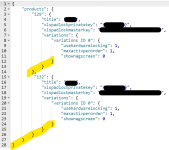
I’m using this json code to allow for multiple workbooks:
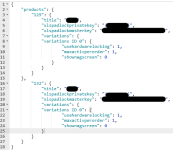
Code used is valid as per: https://jsonlint.com/
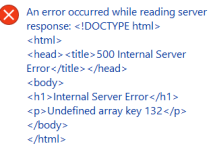
Product 129 activates fine, but activating product 132 generates this error message:
I can see that this user had the same problem back in 2022… and was able to fix it. But I can’t see how it was fixed:
 Adding new products XLS Padlock
Help, please!
Thanks
I’m using this json code to allow for multiple workbooks:
Code used is valid as per: https://jsonlint.com/
Product 129 activates fine, but activating product 132 generates this error message:
I can see that this user had the same problem back in 2022… and was able to fix it. But I can’t see how it was fixed:
The error is definitely in the json and not anywhere else, because when I have product 132 as the only product in the code, it activates fine. The problem arises when I try add more than one product to the code.Hello, I wonder if you could help me with this error ? The activation of the product “13” works just perfect, I validated the json file on https://jsonlint.com/ and it is valid. [xls 5] [XLS 0] [XLS 1] [XLS 2] [XLS 3]
Help, please!
Thanks
Last edited: