
You are using an out of date browser. It may not display this or other websites correctly.
You should upgrade or use an alternative browser.
You should upgrade or use an alternative browser.
Codeigniter installation
- Thread starter Spectr
- Start date

CodeIgniter 3 works without any specific tweaking. Just leave the base URL empty in config.php
or modify it like this:
$config[‘base_url’] = ‘https://heserver/’;
if you use HTTPS protocol as here:
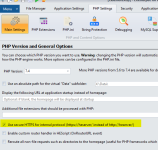
or modify it like this:
$config[‘base_url’] = ‘https://heserver/’;
if you use HTTPS protocol as here:
To set up a database server with ExeOutput, check this video:
You just forgot to enable the MySQL PHP extension in ExeOutput. Go to PHP Settings / PHP Extensions and enable the correct extension.
A step-by-step guide will follow one day, but currently, we are working on a lot of projects and there is not enough time for that guide. Especially, we are also focused on CodeIgniter 4 for ExeOutput.
aadiimughal1
New member
I also need help, i’ve converted codeigniter into exe file. but now i’m unable to upload images i need help in.