Yes, both Paquet Builder and XLS Padlock (2025 versions) now offer cloud code signing, thanks to the new SignTool integration.
Choose SignTool Commands as the Code Signing Method:
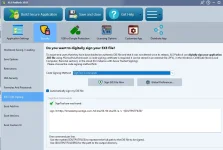
Then enter the necessary parameters for signtool, generally sent to you by your Code Signing provider.
For instance, in case of a DigiCert certificate, you'll have to install their
Software Trust Manager clients tool in order to have access to the cloud hosted certificate. Then, the command to be used in XLS Padlock or Paquet Builder will look like:
Code:
sign /csp "DigiCert Signing Manager KSP" /kc key1 /f example.crt /tr http://timestamp.digicert.com /td SHA256 /fd SHA256 "{$OUTPUTFILE$}"
Note that Azure Trusted Signing certificates...


