Cannot Import DLL

hosco

New member
First I want to say - ExeOutput is a great program. We are close to our first release and will be purchasing at that time.

I’m trying your code from your faq: How can I minimize the window?
that looks like:
Code:
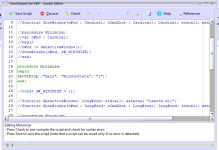
function GetActiveWindow(): LongWord; external "[email protected] stdcall";  

function ShowWindow(hWnd : LongWord; nCmdShow : LongWord): LongWord; external "[email protected] stdcall";  

Const
SW_MINIMIZE = 6;  

procedure Minimize;
var hWnd : Longint;
begin
hWnd := GetActiveWindow();
ShowWindow(hWnd, SW_MINIMIZE);
end;
I get the error “Cannot import dll:user32.dll” on the first line.

As a test I also tried a script with just this line:
Code:
function GetFileAttributes(lpFileName: string): LongWord; external "[email protected] stdcall";
and I got a simular error: Cannot Import dll:kernel32.dll

I’ve tried calling from both javascript and php.

Thanks for any assistance you can give and
Happy New Year!!!
 
Last edited:
oh - as a follow up

What we are doing is gradually migrating an MS Access program to ExeOutput. And there are certain times when Access forms have the focus and we can’t allow our customers to get to the ExeOutput window.

So the plan is to hide the ExeOutput window until it is ready to get the focus back.

Thanks for your time.
 
Last edited:
If you wish to hide the main window, you could try:
Code:
procedure Minimize;
begin
SetUIProp("bsBusinessSkinForm1","WindowState","1");
end;
It uses the built-in code instead of a Windows API that may not be compatible with the skin engine.
Possible Values:
Normal: 0
Minimized: 1
Maximized: 2

Or even, if you work with the tray icon feature, you may use the built-in functions:
procedure TrayShowMainForm;
and
procedure TrayHideMainForm;

For instance:
Code:
procedure Minimize;
begin
TrayHideMainForm;
end;
 
Last edited:
Hello,

I can not minimize the main window in V2.2

procedure Minimize;
begin
SetUIProp (“bsBusinessSkinForm1”, “WindowState”, “1”);
end;
 
bsBusinessSkinForm1 doesn’t exist anymore in ExeOutput 2018. You have to try:
procedure Minimize;
begin
SetUIProp (“main”, “WindowState”, “1”);
end;
 
That’s normal. It must be run from the GUI (for instance, with a button), not from PHP.
PHP applications are multi-threaded applications so the best is to use JavaScript or HEScript to change the GUI. Otherwise, yes, you can have crashes in some situations.
 
Ok,
it worked out that way
javascript:exeoutput.RunHEScriptCom(“Minimizar.Minimize”);

thank you !
 
Last edited:
Back
Top