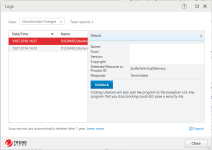
gdgsupport Support Staff member Jul 20, 2018 #2 Looks like your Trend Micro is configured to detect use of Windows internal APIs. ExeOutput uses them to create a virtual environment for PHP. Nothing wrong, and Trend Micro has a false positive. Choose Unblock. Learn more about that API: https://undocumented.ntinternals.ne...ment/Virtual Memory/NtWriteVirtualMemory.html
Looks like your Trend Micro is configured to detect use of Windows internal APIs. ExeOutput uses them to create a virtual environment for PHP. Nothing wrong, and Trend Micro has a false positive. Choose Unblock. Learn more about that API: https://undocumented.ntinternals.ne...ment/Virtual Memory/NtWriteVirtualMemory.html
K kendry New member Aug 8, 2018 #3 Thanks for replay. Situation happen on computers with limited privileges so he/she can not choose unblock. Can we somehow get around this problem?
Thanks for replay. Situation happen on computers with limited privileges so he/she can not choose unblock. Can we somehow get around this problem?
D damian New member Aug 8, 2018 #4 is there a chance to get around this problem? This situation is on computers with limited privileges.
is there a chance to get around this problem? This situation is on computers with limited privileges.
gdgsupport Support Staff member Aug 8, 2018 #5 You can contact Trend Micro’s support team to ask them to whitelist your EXE file. Another possibility is to code sign your EXE file: https://www.exeoutput.com/help/codesigning
You can contact Trend Micro’s support team to ask them to whitelist your EXE file. Another possibility is to code sign your EXE file: https://www.exeoutput.com/help/codesigning