oldteacher
Active member
Updated to Windows 11.
Edition Windows 11 Pro
Version 24H2
Installed on 3/29/2025
OS build 26100.3476
Experience Windows Feature Experience Pack 1000.26100.54.0
Just tried to load existing project after starting up ExeOut 2024.2. This project was listed in recent area.
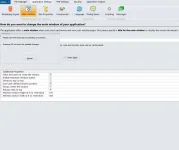
Cannot dismiss the popup shown in screenshot. Cannot cancel. Cannot use at all:
Only way to exit is use task manager to end.
I also tried opening from the project folder, same issue.
Edition Windows 11 Pro
Version 24H2
Installed on 3/29/2025
OS build 26100.3476
Experience Windows Feature Experience Pack 1000.26100.54.0
Just tried to load existing project after starting up ExeOut 2024.2. This project was listed in recent area.
Cannot dismiss the popup shown in screenshot. Cannot cancel. Cannot use at all:
Only way to exit is use task manager to end.
I also tried opening from the project folder, same issue.