Compiled App (EXE) functions properly on Dev Machine but not on "Customer" machines!

Hermannjt

New member
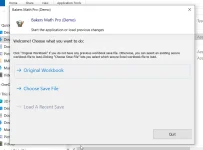
I have set up a Keyless (local testing only for simplicity) version of one of my apps for pre-Beta testing to make sure I have no surprises when I am ready for the actual Beta testing. MY primary dev machine is a Win 11 laptop with Office 2021 (Pro +) and I also set up VM on the laptop with Win 10 Pro & Office 2013 64-bit. My desktop, which is my fallback (with Office 2013 32-bit), both for dev and testing purposes; both desktop and laptop have the XLS-PadLock plugin installed. When I run the app on the laptop (native IOS) Dev it opens properly to the "Choose what you want to do" prompt and upon selection it properly opens the compiled Workbook to the "Navigation" userform and I am able to work with it without issue. When I run the app on the VM, desktop or my wife's laptop (Win 10 & Office 2013, 32-bit) the app opens to the "Choose" prompt and on selection tries to open the workbook but generates two/three errors which are hidden behind the Splash Screen.
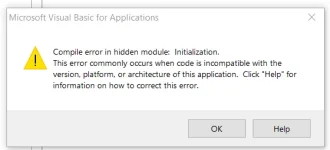
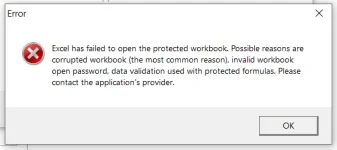
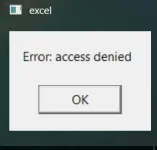
The only way I am able to see the first error is to click on the taskbar "Excel" icon which shows the "Access Denied" error and closing it allows access to the splash screen "If Nothing Happens" button. When I click on the "If nothing ..." button another prompt comes up asking if I want to Reload the Workbook. Clicking "NO" reveals another popup Error "Compile error in hidden module:", while clicking yes to "reload" workbook the display popup reads "Excel failed to open the protected workbook."

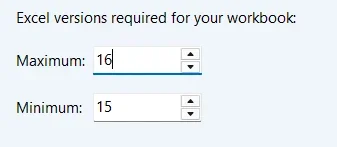
I compiled the workbook as "Universal". I have tested compiling the app on both the Laptop and Desktop and the app only functions properly on the Laptop native IOS.

In each scenario I download the app from my file server to a folder (or Desktop) on each device to avoid unwanted interaction. I have attached images below. Can someone please point me in the proper direction?
 

Attachments

  • Access Denied Error.webp
    Access Denied Error.webp
    3.5 KB · Views: 0
  • App Open.webp
    App Open.webp
    36.1 KB · Views: 0
  • Compile Error.webp
    Compile Error.webp
    13.3 KB · Views: 0
  • Compiled Versions Selections.webp
    Compiled Versions Selections.webp
    5 KB · Views: 0
  • Excel Failed to open Error.webp
    Excel Failed to open Error.webp
    14.2 KB · Views: 0
The pattern in your own results points straight at the cause: it runs on your Office 2021 laptop and fails on every Office 2013 machine, in both bitnesses. That rules out 32 versus 64-bit, and it rules out the individual machine. The common factor is Excel 2013, and the "Compile error in hidden module" message is Excel telling you why: the workbook's VBA project does not compile under that version of Office. Everything else you see follows from it. When the VBA fails to compile, the protected workbook cannot finish opening, which is the "Excel failed to open the protected workbook" message, and the earlier "Access Denied" is part of the same failed open.

This is worth stressing because it is not really an XLS Padlock issue: XLS Padlock supports Excel from 2007 to 365, so 2013 is fine on its own. What is happening is a standard "developed on a newer Excel, will not compile on an older one" problem in the VBA itself, and the packaging is only where you happen to notice it.

The fastest way to prove it and to find the exact spot is to take XLS Padlock out of the picture for a moment. On one of the Office 2013 machines, open your source workbook, the .xlsm before you compile it with XLS Padlock, and in the VBA editor choose Debug then Compile VBAProject. It will stop on the same failure and jump to the offending module and line. If the plain workbook does not compile in Excel 2013, you have found it, and it has nothing to do with the compiled build.

When you do that, these are the usual reasons a project compiles on 2021 but not on 2013, in the order worth checking:

  • A broken reference. Open Tools then References on the 2013 machine and look for any entry marked "MISSING:". A library you reference on your 2021 laptop may be a different version, or absent, on 2013, and that alone throws "Compile error in hidden module".
  • Object-model members that did not exist in Excel 2013. Any property, method or enum added to Excel in 2016 or later will not compile in 2013. This is the most common trap when the development machine is newer than the deployment target.
  • Early binding to a version-specific library. Where you can, switch those to late binding (declare the variable As Object and use CreateObject) so the code does not bind to a type library version that varies between Office releases.
  • API Declare statements. Excel 2013 already uses VBA7, so any Declare must carry the PtrSafe form and use LongPtr, guarded with "#If VBA7 Then". This is less likely to be your cause since it fails on 32-bit 2013 as well, but it is quick to confirm.
The right fix is to build against your lowest supported target: get the source workbook compiling cleanly in Excel 2013 first (remove the missing reference, replace the post-2013 member or late-bind it), then recompile with XLS Padlock. A project that compiles in 2013 will run in 2021 as well, so 2013 is the version to develop against.

Tell us the full text of the "Compile error in hidden module:" message. The module name after the colon is the single most useful clue, because it names exactly which module holds the incompatible reference or code, and it is cut off in your description.

If it is easier, open a support ticket and send us the source workbook by WeTransfer. We can compile it here against Excel 2013 and tell you precisely which reference or line is the one 2013 rejects.
 
Thank you for your detailed response. All symptoms pointed to the missing "GSLXForm Library"; I ran into compile errors in the same "Hidden Module" when I tried loading the WB on computers lacking XLS Padlock.
The right fix is to build against your lowest supported target: get the source workbook compiling cleanly in Excel 2013 first (remove the missing reference, replace the post-2013 member or late-bind it), then recompile with XLS Padlock. A project that compiles in 2013 will run in 2021 as well, so 2013 is the version to develop against.
I compiled the app on my desktop (Office 2013) and tested it there and on my laptop (primary dev machine) and the app opened properly on both machines; I have not tested this on my wife's laptop (with Office 2013, 32-bit) but, by compiling the app as "Universal" there should be no issue.

I have been banging my head on this issue for almost 2 weeks! I wish I had posted this much earlier!:oops:

I cannot thank you enough!
Thanks again!
 
Back
Top