
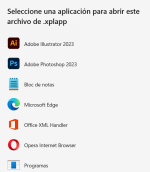
I have tried to implement the option to deactivate that comes in the user guide, but when combining the option with EXE + application XPLAPP Bundle, I get this message:
The user guide comes with this example:
Public Sub StartDeactivation()
Dim XLSPadlock As Object
On Error GoTo Err
Set XLSPadlock = Application.COMAddIns(“GXLSForm.GXLSFormula”).Object
XLSPadlock.PLDeactivate
Err:
End Sub
’ You can then invoke the sub thanks to a macro assigned to a button for instance:
Sub AskForDeactivation()
Dim response As Integer
vbQuestion + vbYesNo, “Confirm Deactivation”)
End Sub
The user guide comes with this example:
Public Sub StartDeactivation()
Dim XLSPadlock As Object
On Error GoTo Err
Set XLSPadlock = Application.COMAddIns(“GXLSForm.GXLSFormula”).Object
XLSPadlock.PLDeactivate
Err:
End Sub
’ You can then invoke the sub thanks to a macro assigned to a button for instance:
Sub AskForDeactivation()
Dim response As Integer
Code:
' Ask the user if they really want to deactivate the application
response = MsgBox("Do you really want to deactivate the application?", _
Code:
' Check the user's response
If response = vbNo Then
    ' If the user selects "No," exit the procedure
    Exit Sub
Else
    ' If the user selects "Yes," you can call the deactivation function here
     Call StartDeactivation
     Application.Quit
End If