
You are using an out of date browser. It may not display this or other websites correctly.
You should upgrade or use an alternative browser.
You should upgrade or use an alternative browser.
Save Dialog Box
- Thread starter barcop101
- Start date

Invoke
ThisWorkbook.Save VBA method without UI prompt.
Yes, because
ThisWorkbook.Save will be caught by XLS Padlock and trigger the usual Save Secure File dialog box asking the user to choose where to save the XLSC file. Then, the file is remembered in the history and users will be able to load it back.I have a similar need as barcop101: I want to open the secure save dialog box via a macro to encourage my customer to save his xlsc.ricdam said:ThisWorkbook.Save
So I tried with ThisWorkbook.Save .
Used in sub A this works fine. Put in an other sub B, this does not work.
Sub B is the Private Sub Workbook_BeforePrint (cancel As Boolean) automatically enabled before a printing process.
If as an alternative in Sub B instead of invoking ThisWorkbook.Save I just call Sub A (containing ThisWorkbook.Save) this does not work either.
I want to make sure, that my customers save their xlsc-files BEFORE they print them and before they create a pdf thereof. The secure save dialog box should therefore open before such an event and the file should be saved before it is printed. How to achieve that?
Could you first check that your events are correctly fired (e.g. by putting a msgbox in Workbook_BeforePrint)?
Looks like Excel doesn’t allow saving once before print is fired. So, there is no possibility for us.
Thank you for investigating.
Yes, I verified that (the uncoded) Excel allows saving once before print is fired using Private Sub Workbook_BeforePrint. However not with the command ThisWorkbook.Save (in the uncoded Excel this command does not initiate saveas and no dialog). The command (or set of commands) needed to saveas with dialog in the uncoded Excel are different. They work in any sub, they are integrated in. However all the different commands explored do not work correctly within the coded Excel.
It is the padlock-coded Excel that does not execute the command ThisWorkbook.Save (saving with xlsc-save-dialog-box) correctly when this command is integrated in the Private Sub Workbook_BeforePrint (cancel As Boolean) or in any other sub called within the Private Sub Workbook_BeforePrint.
So the problem only arises with the padlock-coded Excel. Why?
For the padlock-coded Excel to initiate saving with the xlsc-save-dialog-box the command ThisWorkbook.Save was recommended. It seems strange to me, that with this command a different action is initiated in the coded Excel (saveas with dialog) than in the uncoded Excel (save without dialog). Why?
Are there alternative commands or set of commands for the coded Excel to initiate saving with xlsc-save-dialog-box?
How can I solve my problem?
Yes, I verified that (the uncoded) Excel allows saving once before print is fired using Private Sub Workbook_BeforePrint. However not with the command ThisWorkbook.Save (in the uncoded Excel this command does not initiate saveas and no dialog). The command (or set of commands) needed to saveas with dialog in the uncoded Excel are different. They work in any sub, they are integrated in. However all the different commands explored do not work correctly within the coded Excel.
It is the padlock-coded Excel that does not execute the command ThisWorkbook.Save (saving with xlsc-save-dialog-box) correctly when this command is integrated in the Private Sub Workbook_BeforePrint (cancel As Boolean) or in any other sub called within the Private Sub Workbook_BeforePrint.
So the problem only arises with the padlock-coded Excel. Why?
For the padlock-coded Excel to initiate saving with the xlsc-save-dialog-box the command ThisWorkbook.Save was recommended. It seems strange to me, that with this command a different action is initiated in the coded Excel (saveas with dialog) than in the uncoded Excel (save without dialog). Why?
Are there alternative commands or set of commands for the coded Excel to initiate saving with xlsc-save-dialog-box?
How can I solve my problem?
Could you try this?
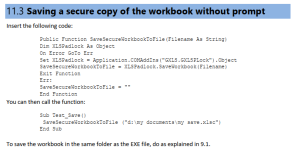
Unfortunately no success:
I tried both the suggested 11.3 method as well as the 11.4 method (Suggest a filename for the save dialog box) from the Padlock Manual.
Both of them I tried as a call from the Private Sub Workbook_BeforePrint (cancel As Boolean) as well as a call from an ordinary sub.
All of them run without error messages. However in none of the 4 cases the save dialog box appeared in the padlock-coded excel!
Whereas the save dialog box appears in the coded excel with the ThisWorkbook.Save call in an ordinary sub (remind my problem: does not appear when ThisWorkbook.Save is part of the Private Sub Workbook_BeforePrint (cancel As Boolean))
I do not understand anyway, what the 11.4 method is aiming at if it is not opening the save dialog box in any case.
I tried both the suggested 11.3 method as well as the 11.4 method (Suggest a filename for the save dialog box) from the Padlock Manual.
Both of them I tried as a call from the Private Sub Workbook_BeforePrint (cancel As Boolean) as well as a call from an ordinary sub.
All of them run without error messages. However in none of the 4 cases the save dialog box appeared in the padlock-coded excel!
Whereas the save dialog box appears in the coded excel with the ThisWorkbook.Save call in an ordinary sub (remind my problem: does not appear when ThisWorkbook.Save is part of the Private Sub Workbook_BeforePrint (cancel As Boolean))
I do not understand anyway, what the 11.4 method is aiming at if it is not opening the save dialog box in any case.
Because we first need to know whether the workbook file is correctly saved as a secure file or not in the Private Sub Workbook_BeforePrint.hpkpf said:I do not understand anyway, what the 11.4 method is aiming at if it is not opening the save dialog box in any case.
Other questions: do you use Application.EnableEvents? And Workbook_AfterSave?
And which Excel version are you using?
Last edited:
Thank you.
Because you first need to know… Either of the two situations may occur.
Yes I use Applications.EnableEvents. It is set on false just before the command intended for saving with xlsc-save-dialog-box. Reason: to inhibit firing of the Public Sub Workbook_BeforeSave.
No I do not use Workbook_After Save.
Excel version: Office 365 Excel Version 1902
MSO (16.0.11328.20140) 64-Bit
Because you first need to know… Either of the two situations may occur.
Yes I use Applications.EnableEvents. It is set on false just before the command intended for saving with xlsc-save-dialog-box. Reason: to inhibit firing of the Public Sub Workbook_BeforeSave.
No I do not use Workbook_After Save.
Excel version: Office 365 Excel Version 1902
MSO (16.0.11328.20140) 64-Bit
Applications.EnableEvents = False is probably the culprit because XLS Padlock uses events to trigger the “Save As” dialog box.
Last edited:

ricdam
New member
Hi Support,
You said in one of the posts above:
Is there a way to not prompt the user and just save the file?
Thanks,
You said in one of the posts above:
But the macro below always prompt the user with the “Save local workbook” dialog box.InvokeThisWorkbook.SaveVBA method without UI prompt.
Is there a way to not prompt the user and just save the file?
It is interesting that if I run this macro in a normal Excel file, it doesn’t not prompt with the dialog box, but it does when I run it in a EXE file.Sub Save()
ThisWorkbook.Save
End Sub
Thanks,
Last edited:
You could use the VBA sample that is in the user guide:ricdam said:But the macro below always prompt the user with the “Save local workbook” dialog box.
Is there a way to not prompt the user and just save the file?
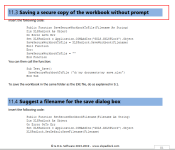
ricdam
New member
Hi Support,
I was using the macro you just suggested but the problem with it is that the EXE doesn’t remember the history, so the user cannot choose “Last Save” and needs to browse to open the file, which defeats the whole purpose of having a macro for easy saving if it makes more difficult to open.
Do you have any other suggestion to run the ThisWorkbook.Save macro without “Save local workbook” dialog box, saving the XLSC file without prompting the user?
Cheers
I was using the macro you just suggested but the problem with it is that the EXE doesn’t remember the history, so the user cannot choose “Last Save” and needs to browse to open the file, which defeats the whole purpose of having a macro for easy saving if it makes more difficult to open.
Do you have any other suggestion to run the ThisWorkbook.Save macro without “Save local workbook” dialog box, saving the XLSC file without prompting the user?
Cheers
That’s strange because the save file made the macro we suggested is indeed stored into the history. So, it should be remembered when you click Last Save. Could you double-check?