Removing option pasword protection

jav2110

New member
I wish the protection of including a pasword to open the protected book really worked.
It would be better to remove this feature from the program, since there is no point in including something that does not work and that would be risky, since if you include an opening password, the program ends up deleting it.
I suggest that you remove this feature from the program since it does not work and is a risk because as I already mentioned, if you include an opening password the xlpadlock program ends up deleting it.
 
Why are you telling it does not work? Testing has been done for the latest update 2024.3 and it appears to work as expected. If not, please provide us with a sample to reproduce your issue, because we are unable to do so.
 
It is enough to use a simple routine to save the current workbook like the following:

Sub Test_Saving()
Dim copyWorkbook As String
Code:
copyWorkbook = C:\Users\javier.delvalle\Downloads\""ExtractedWorbook.xlsb"


    ThisWorkbook.SaveAs copyWorkbook
End Sub

Even if the protected workbook has a password, it is deleted.
The same thing happened with the save boxes that appear in Office 365, where it allowed the user to save the protected workbook in a OneDrive path, the file was saved and opened easily without requesting a password. This is really disappointing, that the security offered by the program could be violated so easily.
 
But that’s expected if you write that VBA code. Or at least add the password too to your SaveAs command.
Once again, the solution also exists and we already exchanged about that.
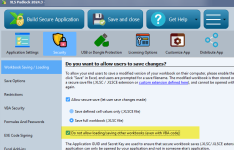
Activate this option:
image

And your SaveAs or OneDrive won’t work, as recommended in the manual.
 
With that option it is possible to protect the workbook, but then why put an option that protects the workbook with a password in your program, which in practice does not work? If it does not offer real protection, the real protection is offered by the option you point out. But it requires once again adapting the code.

It is not very functional and not productive, because if you use one option others stop working.
For example, I try the VBA compiler, and you have to change the code, and you find that many things are not compatible, and many errors in the implementation, which translates into a great loss of time.
I have used this program for a long time, but I am going to replace it, because it does not generate real protection, and implementing some of its features is not sufficiently tested, and generates a great loss of time. Suddenly users get errors that it is not clear how to solve.
 
Back
Top