Open the file "%DESTPATH%\xyz.exe" (open) - how can it wait til Exe runs?

excelvbaisfun

New member
Hi @gdgsoft and all,

I tried executing an exe command, but it turns out I need Unelevated rights so the Exe file within Paquet Builder file will go to the AppData Local folder instead of Program Files.
So I read in the documentation that I can use “Open the file” and check the Unelevated box.
But now all the other steps are running before the user can finish this install step. Is there a way I can open the EXE Unelevated and have it wait until this program is done or closed?

Thanks
Dan
 
excelvbaisfun said:
I need Unelevated rights so the Exe file within Paquet Builder file will go to the AppData Local folder instead of Program Files.
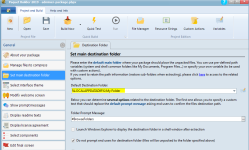
You can keep Elevated rights and still have your files unpacked to the AppData local folder. Just change the destination folder to the value as shown on the screenshot:
image

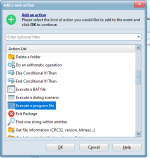
To run your Exe file, do you use the following custom action?

image
 
Last edited:
Hi @gdgsupport ,
I didn’t explain perfectly. The PB executable needs to run SeleniumBasic-2.0.9.0.exe with Unelevated rights. The SeleniumBasic-2.0.9.0.exe file creates the directory, not PB.

Then it needs to take the file from the package and place it in the %LOCALAPPDATADIR%\SeleniumBasic\ folder.
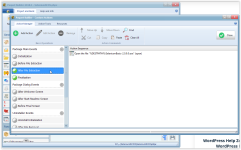
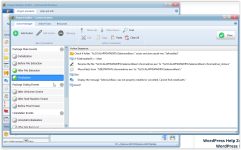
These screenshots may help.
image

image

The problem is when I open the SeleniumBasic-2.0.9.0.exe file with unelevated rights using the OPEN FILE instead of EXECUTE A PROGRAM FILE, it doesn’t have the same option to wait until finished. Thus, the Finalization in Custom Actions is not able to wait and thinks the file path doesn’t exist.

It displays the message “SeleniumBasic was not properly installed or cancelled…” that I put in the IF THEN ELSE statement.

Thanks
Dan
 
Yes, “Open a file” is not able to wait for the EXE to finish. The sole solution remains using an EXECUTE A PROGRAM FILE custom action. In your case, if you don’t need elevated rights at all, just configure your package not to request them at startup and keep an EXECUTE A PROGRAM FILE custom action.
No elevated rights are required for writing to the Local AppData folder.
 
Last edited:
Back
Top