How to Prevent Excel Sheets from Opening in My App’s Instance (EXE)?

PBigOS

New member
I have an Excel-based app converted into an EXE using XLS Padlock. When the app (EXE) is running, if I try to open another Excel sheet, it opens without menus or ribbons, behaving as if it’s part of my app’s instance.

How can I configure it so that opening a separate Excel sheet starts in a new instance of Excel with full menus and ribbons, independent of the EXE app?

App converted with 2024.2 version.

Any guidance or suggestions would be appreciated!
 
None of these works for me. Still getting limited version of excel in other instance.
Tried different options. Checked/Unchecked.

xls
 
Could you please verify that you have no other Excel instance opened before starting the EXE? With Task Manager.
From what you describe, it looks like Excel is somehow storing your specific UI somewhere for other instances.
 
I noticed as follows:
  • I start Excel after restarting system Excel starts with standard UI.
  • Then I open my app EXE.
  • Next excel sheet opens with standard Excel UI.
This only works when I have first instance of Excel running.
  • When I close first instance of original Excel then all sheets opens in App EXE instance UI.
This happends on Win 10 PRO 10.0.19045
Problems started after upgrading from 2021.1 to 2024.2
 
This option works in the opposite way—it consolidates all open workbooks within the App EXE instance.

I rolled back to version 2021.1, and everything works fine.

The client uses Excel 2010 on Windows 10 Pro, and the App EXE is actively used on 550 PCs. I cannot compel them to update Excel.

How can I reconcile the future requirement to use version 2024.2 for Windows 11 Pro with 24H2 (which is currently not functioning properly, requiring me to ask the client to uninstall the update) with the necessity of maintaining compatibility with MS Excel 2010?
 
We’ll try to reproduce the issue with Excel 2010. Could you please send us the workbook file you used to create the custom UI. Not necessarily your entire workbook, just the UI part.
 
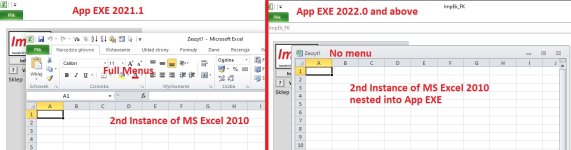
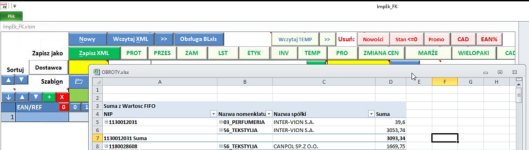
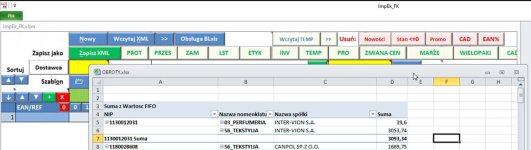
I conducted further research. It turns out that the unwanted change has been present since version 2022.0. Below are screenshots to illustrate the issue.
AppEXE
 
Please also include your XLS Padlock project file in addition to the EXE file.
You can zip them and upload them to https://wetransfer.com
This is a free file hosting service: after upload, they will give you a URL. Please send us this URL so that we can download the Zip archive.
 
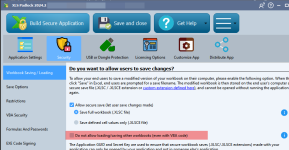
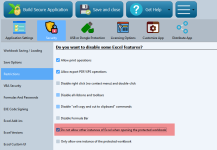
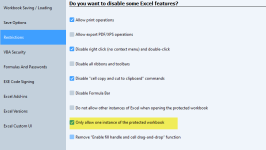
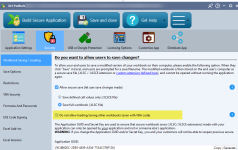
Could you please try to activate this option in your project to see if the problem still occurs on your side? Thank you.
image
 
With this option active I can’t open any other xls file while running my app.
image

before it was as mentioned previousle. xls is opened inside app instance:
image
 
I’m not talking about opening workbook via my app.
I’m talking about situation where I’m going to explorer and then with double click I try to open another workbook. The issue is that It’s opened inside my app instance so that all menus are hidden.
Just like here:
image

OBROTY.xlsx are seperate workbook dobleclicked in Explorer. I want to see all menus like File, Edit, Insert, Data etc
 
But with the option recommended here:
gdgsupport said:
Could you please try to activate this option in your project to see if the problem still occurs on your side? Thank you.
At least, other workbooks do not open in your secure instance. Isn’t that the goal you expect?
 
Back
Top