How to change height of toolbar icon

webguy22

Member
I just want the words/caption in each toolbar icon. I was able to remove the png’s (right or wrong I entered 99 in ImageIndex (program blows up if empty) and blanked out Images) but cannot get the icon height to change. It’s currently at 65 and it will not let me change. On the GUI, I’m able to select the icon’s lower bar and drag it upwards. But it doesn’t stick either.

Forgot to mention that dragging the icons left, right, and corner handles does increase (or decrease) icon width. Just can’t get the height to change.
 
Last edited:
I learned the hard way if you just enter a value and not click outside the box, it does not change.

Enter your value and then click box below/above and then save.
 
Yes, I have done that. I learned that lesson too. I have clicked inside, outside, above, below, you name it. I even made the change and clicked Ok. After clicking Ok, the value reverts back on the fly!

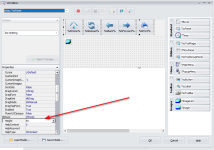
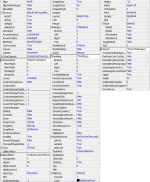
Trying different things. For example, I made all the Anchors false. Made sure Margins were zero. And some other settings to false. Nothing is allowing the height to change. Here are the Properties of my Home icon:

image
 
Last edited:
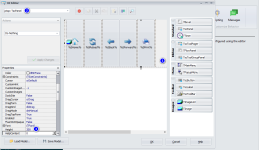
Only thing I can think of is you are not clicking the main bringing ptop: TscPanel (1) into focus, then changing value.

I am not positive if I am even doing it right but has always worked for me.

image
 
Glad to hear it got you back on track. I have been in your shoes!

If you do not mind, could you mark the above answer as the solution?

Cheers!
 
Back
Top