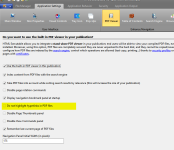
How do I enable cut & paste and get rid of the purple boxes?

dgross

New member
I sent off my project for client review, but the client found many problems:
  1. Cut & paste is not working in pdf documents
    I’m making a teaching tool for classroom use. I want the students to be able to cut & paste text –
    I don’t have any security profiles turned on, yet I can’t cut & paste text.
    I’m looking at SECURITY > SECURITY PROFILES > Page Restrictions tab – nothing is checked
    I applied the “no restrictions apply: all rights enabled” profile to all my documents, but I still can’t cut/paste from pdfs.
    (cut /paste is working in HTML documents)
  2. See the attached image – Purple rectangles are showing throughout the text in my pdf files. The client cut & pasted text from Wikipedia into Word – then converted to pdf. Somehow, the articles brought with them their hot links. But even when the links are removed, a light purple box remains where a link used to be. These shapes do not appear in Acrobat or Foxit pdf reader, only in your interface. What is the solution?
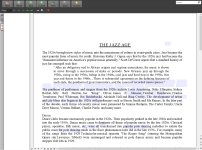
    screen-capture-showing-purple-rectangles
 
Last edited:
Thank you – it worked. I thought I had unchecked that box.

How can I enable cut & paste in pdf docs? The cursor is an arrow in pdf documents – not a text tool – so I can’t highlight/select text.
 
Wow – I had no way to know what that icon does.
Of course, now it works.
  1. Can I give the cursor right-click options like “copy” “paste” ?
  2. Can I replace that icon with a different icon – maybe a button that says
    "Click to change to Selection cursor" ?
  3. If I replace that icon with a longer button, will the rest of the icons shift over?
  4. Is that icon row editable HTML?
 
dgross said:
Can I give the cursor right-click options like “copy” “paste” ?
No
dgross said:
Can I replace that icon with a different icon – maybe a button that says

“Click to change to Selection cursor” ?

If I replace that icon with a longer button, will the rest of the icons shift over?
The toolbar is currently not editable but we are working on that too.
 
Can I force the cursor in the PDF viewer to default to the text selection cursor?
Can you give me a script to make work?

There is an inconsistency in the cursor behavior:
On an HTML document, the arrow cursor will highlight the text if the user clicks and drags.
But in a PDF document, the arrow cursor scrolls the document if the user clicks and drags.

I would like the PDF arrow cursor to behave like the HTML arrow cursor.
 
Last edited:
Back
Top