

 We are pleased to announce the release of ExeOutput for PHP version 2024.1.2, bringing a host of new features and improvements to enhance your PHP app development experience.
 Download the latest version of our PHP to EXE compiler here.
What’s New in Version 2024.1
- Full Windows 11 24H2 Compatibility: ExeOutput for PHP now fully supports Windows 11 24H2, ensuring your applications run smoothly on the latest Windows version.
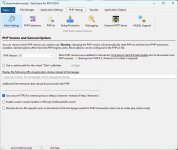
- Appearance Environment Options: Choose between the default Silver theme or the standard Windows UI theme (see screenshot above). A dark theme is planned for a future release.
- Enhanced Debugging with the Chromium Developer Tools in Popup Windows: We’ve added a new option in the Rendering Engine that allows you to have the Chromium Developer Tools in secondary windows, making debugging more convenient.
- Updated PHP Support: Initial support for PHP 8.4.0 RC2 has been added, along with updates for PHP 8.1.30, 8.2.24, and 8.3.12, keeping your projects up-to-date with the latest PHP versions.
- CEF Upgrade: Upgraded the Chromium Embedded Framework (CEF) to version 129.0.12, including a new option to keep CEF version 109 for Windows 7 support. Applications which use the latest CEF version will require Windows 10 or higher, same requirement for PHP 8.2 and later.
- New Disable Find Dialog option to remove the CTRL+F shortcut for the Find dialog box.
- Improved Accessibility: Enhanced support for high-contrast Windows themes, improving accessibility for users with visual impairments.
- Bug Fixes and Performance Improvements: Resolved issues including the infinite “Please Wait” dialog during printing, handling of
$_GETkeys starting with a ‘?’ in the External HTTP Server, fixed some random crashes due to broken connections in the External HTTP Server and improved stability when closing secondary windows that were opened with the context menu.
 Stay updated by subscribing to our newsletter, and thank you for your continued support! Read the full changelog and download ExeOutput for PHP 2024.1 here.
 UPDATE 10/24: new 2024.1.2 minor update available with bug fixes.
Attachments
Last edited:
