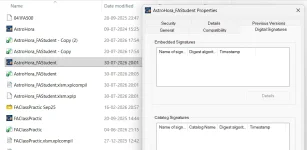
The Digital Signatures tab in your screenshot indicates that there is no signature on the file at all. The signing step did not produce anything, which is why there is no timestamp to see. That is good news in a way, because it means you are looking for one failure rather than two.
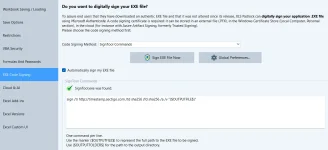
Your configuration itself looks right, so please do not start changing it at random. Your command is correct:
sign /tr http://timestamp.sectigo.com /td sha256 /fd sha256 /a /v "{$OUTPUTFILE$}"
The timestamp part,
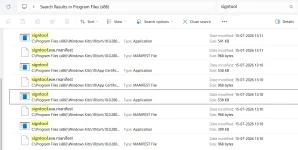
/tr with a valid Sectigo URL, is exactly what you want, the hash options are right, and the output file marker is correct. SignTool is found, as XLS Padlock confirms with the green tick.
The part we would look at first is
/a. That switch tells SignTool to pick the best certificate
from your Windows certificate store by itself. If there is no code signing certificate with its private key installed in the Personal store of the account you build under, SignTool stops with "No certificates were found that met all the given criteria" and signs nothing, which matches what you are seeing exactly.
Anyway,
everything SignTool prints is written into the compilation log, exactly like the rest of the build. The log sits next to your workbook and carries the same name with
.xplcompil.log appended, so in your case:
AstroHora_FAStudent.xlsm.xplcompil.log
Open it in Notepad and look at the end, after the compilation lines. SignTool's own output is there, including for the automatic signing that runs after the build, which is otherwise invisible because no window appears. Whatever the real error is, it is written there in plain text. That single file will very likely tell you the answer immediately, and if you post the signing lines here we can read them with you.
Two other things worth doing while you are at it:
- Click "Sign EXE File Now" on that same page after a build. It runs the same command interactively, so you see it happen rather than reading about it afterwards, and it is a quick way to confirm the log matches what you observe.
- Check that you have a code signing certificate available. Press Win+R, run
certmgr.msc, open Personal then Certificates, and confirm there is a certificate whose intended purpose includes Code Signing and which shows a private key. If you sign with a certificate file instead, replace /a with /f "path to your pfx" /p yourpassword and try again.
Also tell us your exact version from Help then About. There was a signing problem in 2026.0 where automatic signing was silently skipped with the SignTool Commands method, and it was fixed in 2026.1, so we want to rule that out rather than assume.
Post the signing lines from that log file and we will get this closed quickly.