webguy22
Member
Using accent-color:black to modify the color of a radio button in a form.
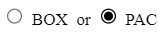
Using ExeOutput 2021.0, when project is compiled, CSS accent-color defaults to blue. On my localhost, using Chrome versions 114.0.5735.199 (Official Build) (64-bit), the radio button is black. Is also black using Firefox 115.0 (64-bit).
I tried both inline style and class. Same result.
I did search and review The Chromium Projects web site for some possible answers. No luck.
Do I need a Chromium extension? If so, how would I install it for ExeOuptut? Or is there an option for rendering engine that I need to turn on? I do have EnableMediaStream checked.
Using ExeOutput 2021.0, when project is compiled, CSS accent-color defaults to blue. On my localhost, using Chrome versions 114.0.5735.199 (Official Build) (64-bit), the radio button is black. Is also black using Firefox 115.0 (64-bit).
I tried both inline style and class. Same result.
I did search and review The Chromium Projects web site for some possible answers. No luck.
Do I need a Chromium extension? If so, how would I install it for ExeOuptut? Or is there an option for rendering engine that I need to turn on? I do have EnableMediaStream checked.
Last edited: