Setting up Trial Versions

Hermannjt

New member
I am approaching the Beta Test phase for an app I have been working on. The production version will have a "No Refund after 15 days, or Product Activation, which ever comes first" policy. Is it possible, like most commercial software applications, to have a pop-up (HTML or MsgBox during the workbook open process) that queries the user whether to continue the Trail Period or proceed with activation? If they choose the "Register" option it would then initiate the Get System ID process for off-line registration.

How might one go about implementing this?
 
Last edited:
Solution
The new error comes from a conflict between the kit's logging and another WordPress plugin on your site. The kit writes its log with the Monolog library, version 3, which it ships in its own folder. To read your WooCommerce orders, the kit then loads WordPress, and with it your plugins. One of these plugins includes an older copy of Monolog, version 2, without isolating it, and PHP uses that older copy when the kit writes its first log line. The two versions are not compatible, hence the message "Cannot instantiate interface Monolog\LogRecord". We reproduced this exact error here.

It only happens when logging is turned on in the kit, and logging is off by default. To fix it:

  • Open inc/config.ini in the kit folder on your...
The error comes from the web server, before the request reaches the WooCommerce Integration Kit.

The HTML in your screenshot is not a reply from the kit. It is a "Checking your browser before accessing" page, a bot protection check that runs JavaScript in a web browser before letting the visitor in. Your application is not a browser and does not run JavaScript, so it receives this page instead of the kit's answer, and reports it as an unreadable server response.

The /hcdn-cgi/ address in that page points to Hostinger CDN. If your site is hosted there with the CDN enabled, this page is shown when one of these is active:

  • "Under Attack" mode
  • a high security level
  • the automatic attack protection
To fix it:

  1. In hPanel, go to Websites > Dashboard > Performance > CDN > Manage > Security. Turn off "Under Attack" mode if it is on, and lower the security level (for instance to Medium), then try the activation again.
  2. If it still fails, ask Hostinger support to exclude the folder of the WooCommerce Integration Kit (the Base Activation URL set in your XLS Padlock project) from the browser check. Hostinger explains that such exceptions can only be added by their support. Give them the full URL, the time of a failed attempt and, if possible, the x-hcdn-request-id header of the blocked request.
  3. To confirm the cause, you can also disable the CDN for a few minutes, try the activation, then enable it again.
The exception should cover the whole kit folder, not only the activation page: deactivation (and online validation, if you enable it) are sent to the same server and would be blocked in the same way.
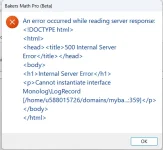
I disabled CDN on the activation subdomain as suggested and received a different, yet promising error.

Activation Error 2.webp

Hostinger support seems to believe it is something in the Activation kit itself. Please advise.
 
The new error comes from a conflict between the kit's logging and another WordPress plugin on your site. The kit writes its log with the Monolog library, version 3, which it ships in its own folder. To read your WooCommerce orders, the kit then loads WordPress, and with it your plugins. One of these plugins includes an older copy of Monolog, version 2, without isolating it, and PHP uses that older copy when the kit writes its first log line. The two versions are not compatible, hence the message "Cannot instantiate interface Monolog\LogRecord". We reproduced this exact error here.

It only happens when logging is turned on in the kit, and logging is off by default. To fix it:

  • Open inc/config.ini in the kit folder on your server.
  • Set enable_logging = false and save the file.
  • Try the activation again.
If you need the log later, the plugin that ships the older Monolog has to be found first: look in your wp-content/plugins folder, and in your theme, for a folder named monolog. Hostinger support can help with that search if you cannot run it yourself.

So Hostinger support was right that the error is raised in the kit's PHP code, but your kit files are not damaged: nothing needs to be reinstalled.
 
Solution
The new error comes from a conflict between the kit's logging and another WordPress plugin on your site. The kit writes its log with the Monolog library, version 3, which it ships in its own folder. To read your WooCommerce orders, the kit then loads WordPress, and with it your plugins. One of these plugins includes an older copy of Monolog, version 2, without isolating it, and PHP uses that older copy when the kit writes its first log line. The two versions are not compatible, hence the message "Cannot instantiate interface Monolog\LogRecord". We reproduced this exact error here.

It only happens when logging is turned on in the kit, and logging is off by default. To fix it:

  • Open inc/config.ini in the kit folder on your server.
  • Set enable_logging = false and save the file.
  • Try the activation again.
If you need the log later, the plugin that ships the older Monolog has to be found first: look in your wp-content/plugins folder, and in your theme, for a folder named monolog. Hostinger support can help with that search if you cannot run it yourself.

So Hostinger support was right that the error is raised in the kit's PHP code, but your kit files are not damaged: nothing needs to be reinstalled.
Thankyou for your response. I made the suggested change, re-attempted Activation using the token, and received the success notification!

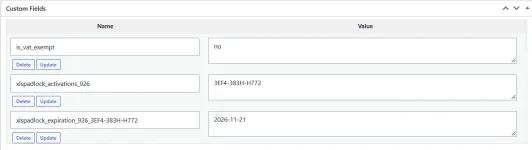
I checked the customer order details and it shows properly activated: see image below.

Order Activated.webp
I also tested Deactivation and everything works properly. Thank you for your assistance.
 
Last edited:
If you need the log later, the plugin that ships the older Monolog has to be found first: look in your wp-content/plugins folder, and in your theme, for a folder named monolog. Hostinger support can help with that search if you cannot run it yourself.
I, and Hostinger support, have searched the entire WP installation and have been unable to locate another folder named "monolog". Do you have any additional suggestions that would allow me to re-enable logging?
 
Thank you for confirming that activation and deactivation now work.

A search for a folder named "monolog" does not always find the copy in cause. Depending on how a plugin bundles it, the library can sit in a folder named "Monolog" with a capital M (the search is case-sensitive on Linux servers), inside a single .phar archive, in a must-use plugin (wp-content/mu-plugins), or in a drop-in such as wp-content/advanced-cache.php or object-cache.php. The PHP error log will not help either: it only names the kit's own file.

The most reliable way is to ask PHP itself which file it loads. Create a file named find-monolog.php in the kit folder, next to its index.php, with this content:

Code:
<?php
// find-monolog.php: TEMPORARY diagnostic for the XLS Padlock WooCommerce kit. DELETE IT after use.
require_once __DIR__ . '/inc/vendor/autoload.php';
$f3 = Base::instance();
$f3->config(__DIR__ . '/inc/config.ini');
restore_error_handler(); // keep plugin notices from aborting the check
require_once realpath(__DIR__ . '/' . ltrim($f3->get('wprelativefolder'), '/')) . '/wp-load.php';
header('Content-Type: text/plain');
echo "Kit's own Monolog: " . __DIR__ . "/inc/vendor/monolog\n\n";
$c = 'Monolog\LogRecord';
if (class_exists($c) || interface_exists($c)) {
    $r = new ReflectionClass($c);
    echo $c . ($r->isInterface() ? ' is an INTERFACE (Monolog 2): CONFLICT' : ' is a class (Monolog 3): OK') . "\nLoaded from: " . $r->getFileName() . "\n";
}
foreach (\Composer\Autoload\ClassLoader::getRegisteredLoaders() as $dir => $loader) {
    if ($file = $loader->findFile($c)) echo "\nComposer copy of Monolog: " . realpath($file);
}
Then open it in your browser, at the same address as the kit followed by /find-monolog.php. It loads WordPress the same way as the kit and shows which copy of Monolog PHP really uses:

  • "is an INTERFACE (Monolog 2): CONFLICT" followed by "Loaded from:" and a path: the folder in that path tells you which plugin or theme ships the older Monolog.
  • "is a class (Monolog 3): OK": the kit's own copy wins at that point. In that case, please post the full output here.
Please delete find-monolog.php right after the test: anyone who knows its address could open it, and it displays server paths. If you post the output here, you can hide the beginning of the paths.

Once the plugin is known, you can check whether an update of it is available, or ask its author whether its copy of Monolog can be isolated. In the meantime, the kit works fully with logging turned off: the log is only needed to investigate a problem.
 
Back
Top