Excel Solver Add-in causing XLSPadlock .exe to not open with settings

PlanIn

New member
Hi, I added Solver add-in to my .xlsb workbook and compiled it and when opened it seems to have caused my workbook code to not recognise that the workbook is running in XLSPadlock environment (ie. the custom icon for the title bar is not showing and showing Excel icon, and code that should only run when not in XLSPadlock runs).
When I remove the add-in and recompile my .exe is all okay with showing my custom title bar icon and recognising the code is running in the XLSPadlock environment. I need the Solver add-in and it is used in a new feature in my workbook code.
Is there some settings that I am missing?
 
The behavior you describe is consistent with XLS Padlock disabling the Solver add-in when the protected workbook starts.

By default, XLS Padlock disables most Excel add-ins in the secured environment for security reasons. Solver is one of the built-in “common Excel add-ins,” so if your workbook now depends on it, you need to explicitly allow it in the project settings. For built-in add-ins such as Analysis ToolPak, Solver, and Euro Currency Tools, you should enable “Allow Excel common add-ins...” so they remain loaded when the protected application starts.
Can you please check if this is the case for your project?
  1. Open your XLS Padlock project.
  2. Go to the section for Excel Add-ins.
  3. Enable Allow Excel common add-ins...
  4. Rebuild the EXE and test again.
If after enabling Allow Excel common add-ins... the problem remains, then the next thing to check would be whether your environment-detection code is being affected by the way Solver is loaded, in which case seeing that VBA snippet would help isolate it.
 
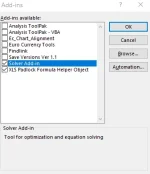
Thanks for looking at this because it is a critical function needed for my workbook. I do have (under Security>Excel Add-ins) the "Allow Excel common add-ins such as Solver..." ticked. I do not have any solver code as at the moment I have just enabled it under File>Options>Add-ins>Manage Excel Add-ins; and ticked the box for Solver Add-in.Screenshot 2026-03-26 111156.webp
So when I compile the .exe and run it, my custom icon does not show and the workbook code does not recognise it is running in XLSPalock. So the code below does not detect XLSPadlock is running (ie. does not set g_IsPadlockEXE to TRUE).

Public g_IsPadlockEXE As Boolean

Public Sub InitAppContext()
'Call once from Workbook_Open
g_IsPadlockEXE = IsRunningUnderXLSPadlockEXE()
End Sub

Public Function IsRunningUnderXLSPadlockEXE() As Boolean
'Based on XLS Padlock VBA API cookbook:
' - Get COM object: Application.COMAddIns("GXLSForm.GXLSFormula").Object :contentReference[oaicite:2]{index=2}
' - Check IsProtected() :contentReference[oaicite:3]{index=3}
' - Read EXEFilename via PLEvalVar("EXEFilename") :contentReference[oaicite:4]{index=4}
Dim XLSPadlock As Object
Dim exeName As String

On Error Resume Next
Set XLSPadlock = Application.COMAddIns("GXLSForm.GXLSFormula").Object
On Error GoTo 0

If XLSPadlock Is Nothing Then
IsRunningUnderXLSPadlockEXE = False
Exit Function
End If

On Error Resume Next
If XLSPadlock.isProtected() = False Then
IsRunningUnderXLSPadlockEXE = False
Exit Function
End If

exeName = XLSPadlock.PLEvalVar("EXEFilename")
On Error GoTo 0

'If we can read a non-empty EXE filename, we’re running as the compiled EXE
IsRunningUnderXLSPadlockEXE = (Len(exeName) > 0)
End Function
 
Excel version: Microsoft® Excel® for Microsoft 365 MSO (Version 2602 Build 16.0.19725.20126) 64-bit
XLS Padlock: 2025 (64 bit)
 
We're unable to reproduce the issue. Would it be possible for you to provide us with your EXE file for internal review?
Or to create a lite sample that would let us reproduce your problem?
Please contact us with PM/DM if you don't want to publicly publish your file(s).
 
Back
Top